

Can Pet Management Software Split Payment Methods on a Single Receipt for High-Value Grooms?
Yes. Pawfora’s POS includes a Split control that splits one bill across multiple payment methods—like cash and card—on a single receipt. As long as payment lines equal the cart total, each tender prints clearly and logs separately in your ledger.
The Short Answer: One Receipt, Several Tenders
A 400 full groom on a big dog often does not arrive on one card. The owner puts 120 in cash on the counter and asks for the rest on a card, or two people at the desk pay separate shares, or a card reaches its limit halfway through. Pawfora's POS lets the cashier record all of that on one sale, with one invoice number and one receipt.
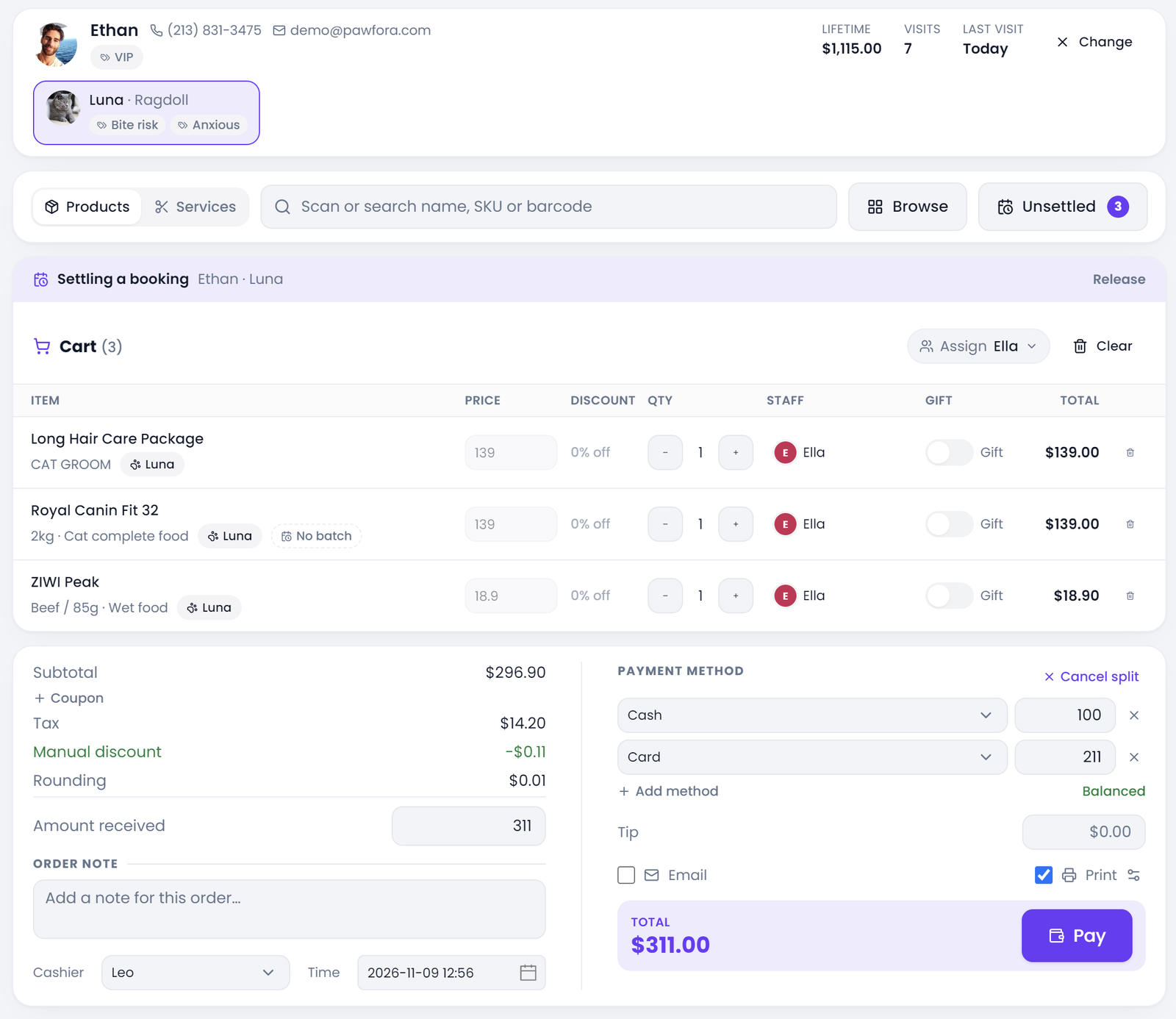
The Split control sits in the payment block of the cart panel, next to the method buttons. Turn it on and the till adds a row for each way the customer is paying: a method, an amount, and a small button to remove it. Nothing else about the sale is duplicated. The cart, the prices, the tax and the pet on the appointment stay as they were. Only the money side gets more than one line.
What comes out is a single document with several tenders listed on it. The pet shop point of sale software keeps one invoice for the visit and one payment row per tender behind it, which is a different thing from writing two separate sales or taking a deposit today and the balance next week. Neither of those is what Split does.
Where a Split Bill Shows Up in a Grooming Day
Anyone who has stood at a front desk on a Saturday knows the shape of this problem. The workaround is usually a note by the till: cash 120, card 280, scribbled on a scrap of paper. That note works right up to the moment the card batch is short at close, or the customer comes back for a refund and nobody can say which drawer the money came from.
A big groom makes the situation more likely, not different in kind. A matting fee, a nail trim, a tip and a bottle of shampoo on the way out push the total past the point where one card is convenient. The till does not care how large the bill is. The same Split control works on a 28 nail trim and a 480 full groom, and the same balance rule applies to both.
It also works when the sale started as an appointment. If the cart has a booking attached, checking out settles that visit through the appointment path, which moves the visit to completed and writes its event history. A walk-in retail sale goes through the plain POS path instead. Both record the same payment rows against the same invoice, so a shop does not need one routine for grooming and another for the retail counter.
How to Split a Payment at the POS Till
Build the cart as usual. The prices, discounts and tax are settled before anybody touches the payment block, so there is nothing to recalculate by hand at this point.
Tap Split. One row appears already holding the full amount, using whatever method was selected. Change that amount to what the customer is actually handing over, then tap Add method. The new row arrives pre-filled with the exact remainder, so the common half-cash half-card case takes one edit rather than two sums. Pick the method from the dropdown and repeat if a third person is paying. Under the rows, the till reads Balanced, or tells you how much is left to allocate in red. Each row has its own amount field and a remove button; remove the last one and split mode closes again.
Two customers paying with two cards can both go down as Card. The till does not insist that every method appears once, and it does not care which card was which. It cares about the amounts. Cancel split puts the panel back to a single method with no extra rows, which is useful when the customer changes their mind while the cashier is still counting.
The Balance Rule: Every Cent Has a Home
The total is not a number the cashier types in. Pawfora works it out from the lines: subtotal, less discounts, plus tax, plus any rounding of up to five cents, plus a tip if there is one. The payment rows have to cover that figure exactly. The till shows the unallocated balance while the fields are still being edited, and the Charge button stays disabled until it reads zero. Short by a cent and over by a cent are both blocked; there is no charge-anyway option.
The server checks again. It recalculates the total from the request, and if the legs differ from it by more than one cent it refuses the whole sale with a payment mismatch error that includes the expected figure. No invoice is created and no payment row is written. That matters most on a large grooming bill with several taxable lines, where rounding one leg can drift by a cent. For an appointment settled from the till, the front end takes the expected figure, nudges the last row by that cent and retries once instead of making the cashier work out which tax line moved.
This is also the clearest boundary of the feature. It is not a deposit, a layaway plan, an installment or a partial payment. A sale is paid in full the moment it is recorded, and there is no state for "still owes" on the invoice. If an owner wants to pay half now and half at pick-up, the software has nowhere to keep that balance; the shop has to handle the arrangement outside the till or ring two separate sales.
Managing Your Store's Tender Methods
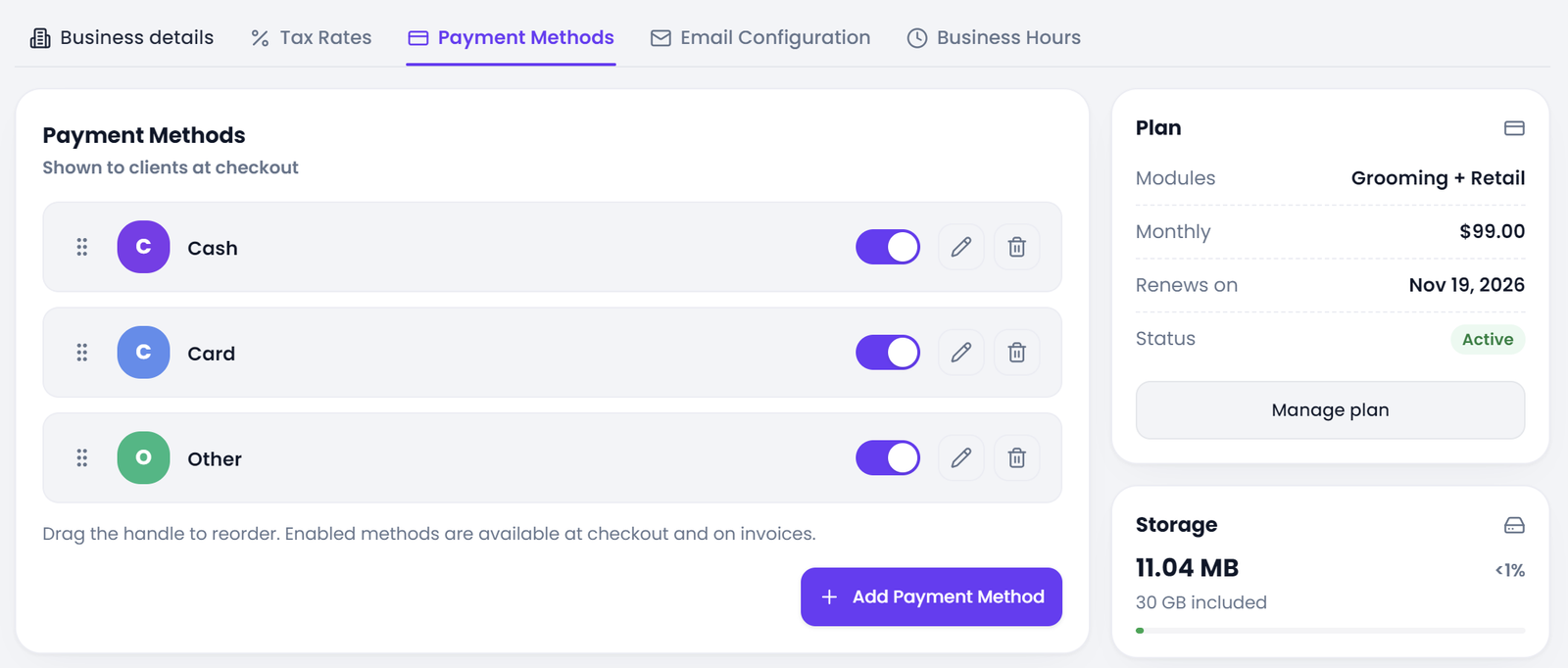
A new account starts with Cash, Card and Other as defaults, nothing more. The list belongs to the shop: a store that takes cash, a card terminal, bank transfer, a mobile wallet and a cheque creates exactly those five entries, gives each one the name the staff will recognise, and leaves the rest out. There is no preset catalogue of tender types to pick from and no fixed number of entries. The three defaults can be renamed or deleted once the real list is in place. Keep the names short and recognisable, since they are what staff pick at speed and what appears on the receipt.
In Settings, the Payment Methods tab lets a manager add a name, edit it, drag the list into the order the shop wants, and switch any method off. Only active methods appear in the dropdown at checkout, and editing the list needs the settings permission, so a cashier cannot invent a method in the middle of a sale. If the shop stops taking cheques, switching that entry off takes it out of the till without changing the sales already recorded under that name.
Whatever name is on that list is what prints on the receipt and what the payment ledger groups by. A shop can even label an entry Gift card if it wants those sales separated in reports. It is a label, though, not a stored-value account. There is no balance to redeem, no card network behind the name, and no field for an authorisation code or the last four digits of a card. The system records a method name and an amount. Anything else about the transaction belongs with the terminal or the shop's own records.
Tips, Taxes, and Change on a Split Receipt
Tax is already inside the total the rows have to cover, and splitting the payment does not change how it is worked out. A tip is added after tax, outside the tax base and outside discounts. It belongs to the sale rather than to a particular card, so it is recorded once against the first payment row instead of being repeated down the list. If a 400 bill carries a 20 tip and the owner pays 120 in cash and 300 on a card, the two rows still add up to the full 420, and the tip appears as one figure, not two. Gift lines are priced at zero but still leave the shelf, so they lower what has to be paid without creating a payment row of their own.
Change is a different kind of number again. When a customer hands over more cash than the bill, the till works out the difference and prints it on the thermal receipt. It is not a payment, it is not stored with the payment rows, and it never reaches the ledger. Keeping those two ideas apart is what stops a cash drawer from looking short at the end of the day.
Receipts, Refunds, and Voids
A split bill either makes sense on paper or it does not. On the 58mm or 80mm thermal receipt, the paper width being a store setting, each payment gets its own line: Paid (Cash) 120.00, then Paid (Card) 300.00. The body of that receipt stays in fixed English while the shop controls its own header and footer. The A4 version a customer can receive by email or as a PDF lists every method and amount in the payment block, with an Amount paid total underneath. Neither version asks the customer to do arithmetic to see that the bill was covered.
Two other documents are worth separating from the customer receipt. The A4 preview that can be printed before charging an appointment still draws a single method, so a split shows up on the document once the sale has been recorded, not before. Internal picking or goods issue sheets are further away again: they carry costs and what the goods earned, with no tax and no payments at all. A split leaves no trace on those, by design.
Behind the scenes, Sales shows one row for the visit, with a label such as Cash / Card. The Payments tab next to it shows one row per leg, because it counts money rather than documents. A 420 groom paid 120 in cash and 300 on a card is one sale and two payment rows. Totals there are grouped by method and keep four figures apart: collected, refunded, voided and net. Tips are listed separately, and method names are grouped without worrying about capitalisation, so a stray lowercase entry does not create a second column at close.
Refunds are where the split earns its keep. In the refund dialog, each original method gets a row and a button restores the original split as the default. The server then checks two things: the amounts have to add up to the refund, and no method can give back more than it took in. A 50 refund on that bill can go back entirely to Card if that channel has room, or be divided the way the customer asks, but it cannot take 150 out of a 120 cash leg. Tips are not refunded. Refund money is written to its own table, leaving the original payment rows as they were, which is why the ledger can still tell both halves of the story.
Voiding is blunter. The whole sale is voided in one action and every payment row is stamped voided at once. There is no per-leg void, so keeping the cash leg and cancelling only the card leg is not an option. A sale that has already returned money cannot be voided at all. Rows are stamped rather than deleted, and that is exactly why a later audit can still see what came in and what went back out.
Ready to Streamline Your Grooming Salon Checkout?
Yes, one receipt can carry several payment methods. The Split control on the POS till adds a row per tender, the till will not charge until those rows cover the total it calculated, and the server repeats that check before writing anything. Each row is stored as its own payment, printed on both receipt formats, and visible on its own line in the Payments tab. Refunds go back through the original channels, while a void takes the whole sale.
A short setup order for a shop turning this on: check that the Payment Methods list in Settings names the ways the counter actually takes money, and switch off anything nobody uses. Run one small split sale on a quiet afternoon and read the receipt before trying it on a 400 groom. If you want to see the split on your own till, start a trial and ring a few real sales before a busy Saturday. If the shop also pays commission or shares gratuities among staff, the payment split and the staff split are separate things, and it is worth reading both.
Related questions: whether a split changes the tax on a grooming bill, what a void does to the two payment rows, how tips are split among groomers.
Related questions
See it on your own shop
Every module is unlocked for 7 days. Set up your services and take a real booking before you decide anything.
No credit card required · Cancel anytime