

What Software Supports Weight-Based Inventory Tracking for Bulk Pet Food?
Yes. Pawfora’s POS lets pet shops track bulk pet food by weight using lb or kg. Cashiers type scale readings directly at checkout, automatically calculating fractional quantities to keep inventory accurate to three decimal places from a single stock pool.
The Short Answer: One Stock Pool, Weighed Sales
Pawfora handles bulk pet food in the same pet store inventory software that runs the appointment book and the grooming invoices. A large bag can be marked as sold by weight. At the checkout the operator enters how much the customer is taking, the till charges for that amount, and the matching fraction of the bag leaves stock.
The shop chooses pounds or kilos, and every weighed sale lands in the stock figure Pawfora keeps for that variant: one number, accurate to three decimals, read by pricing, cost, refunds, counts and valuation. That is why the weight on the receipt and the quantity in the inventory report agree. A 20 lb bag can be sold by the scoop from the first portion to the last, and the shelf figure stays honest.
Where Bulk Pet Food Fits in a Grooming Day
Picture a shop that stocks a 20 lb bag of kibble behind the counter. A customer finishing a grooming appointment wants 3.5 lb for the weekend rather than the whole bag. The operator scoops it, reads the scale, and types 3.5 into the cart line. Pawfora knows one bag weighs 20 lb, so it treats that reading as 0.175 of a bag and charges and deducts the same fraction. The receipt shows 3.5 lb. Twelve bags in stock become 11.825.
One SKU covers both sales. The same price, the same shelf quantity and the same record of what left serve the scoop and the whole bag, so the open bag stays on the shelf figure with nothing to reconcile at closing time. The weighed line sits on the same invoice as a nail trim or a shampoo, with the store's usual tax rules. The weight is simply how this one line was entered.
Setting Up a Bag You Sell by Weight
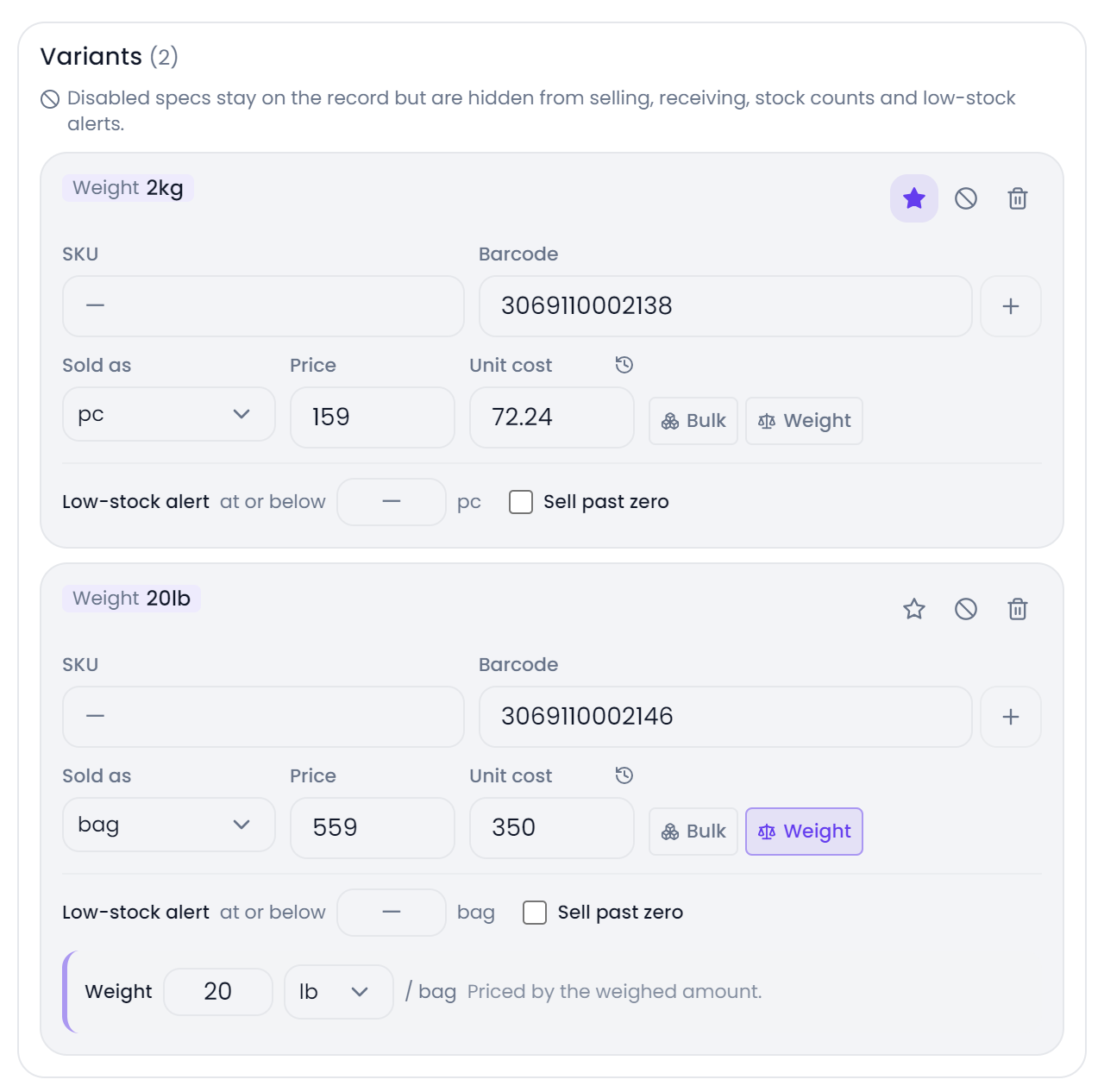
The product form is where the whole thing starts. Each variant has a Sold as unit, chosen from a list such as bag, pack, box, tub or case, plus a price for one of those units, a cost and, if you want, a low-stock alert level. Turning on the Sold by weight chip adds the net weight of one selling unit, the weight unit to measure it in, and the packaging the goods arrive in.
Enter the net weight in the unit that matches the scale; the till needs that figure to work out what fraction of a bag is leaving. The shop sets pounds or kilos once in Settings, and any weighed product can override it, so a pound scale at the front counter and a kilo scale at the grooming desk can share one catalogue. That choice follows the line into the till input, the per-weight price, the remaining-stock hint and the printed receipt.
Pricing stays where a shop expects it. You price the bag, and the register derives the per-pound or per-kilo figure from the net weight and shows it beside the line so the operator can sanity-check the reading. Change the bag price during a sale and the hint changes with it.
Unit names come from the shop. The selling unit, purchase unit and weight unit are free text, and the product CSV carries all three as editable columns, so the wording suppliers and staff already use can be rolled out across the catalogue in one pass. The template has 28 fixed headers, matched exactly, including unit, purchase_unit, case_qty, case_price, weight, weight_unit, by_weight and extra_barcodes; Sold by weight is a yes or no value. For a quick start, the product form offers twelve common counting units.
At the Till: What the Operator Actually Types
On a weighed line, the cart shows a number field. The operator reads the scale, types the amount, and leaves the field or presses Enter to commit it. Decimals are fine, which matters because scales rarely return whole pounds.
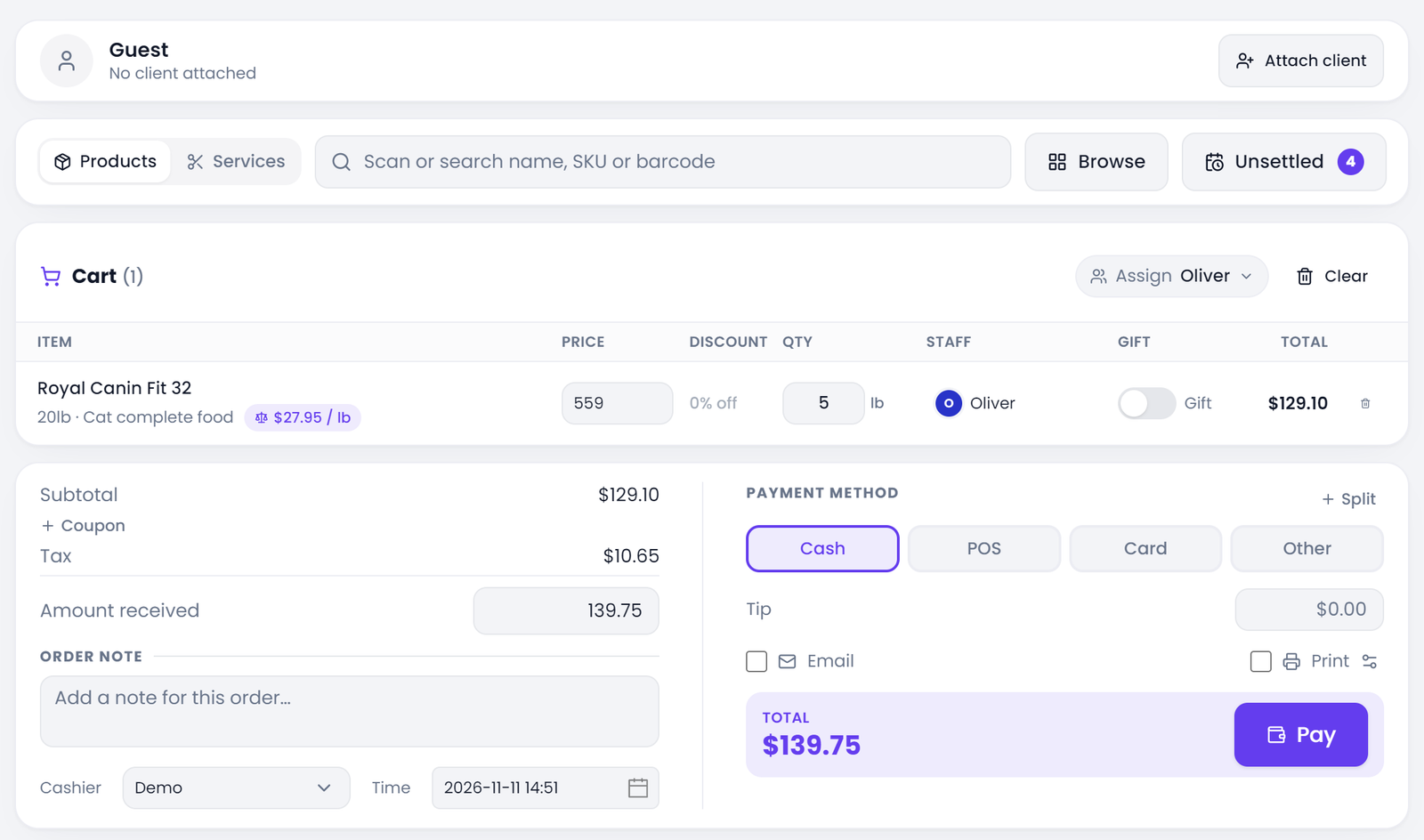
Next to that field the line displays the derived price per pound or kilo in the unit set for that product, with a note saying what one pack weighs and that the line is priced by the weighed amount. The product picker does the same before the sale: its stock label turns the underlying pack count into a readable weight, so "4.825" becomes something like "97 lb left". Behind that display the shelf figure stays a count of bags.
The till checks the entry and the shelf before it commits the line. If the amount asked for exceeds what is on hand, it says how much is left in the weight unit the shop uses. The till receipt and the settlement view print the weight the customer was charged for, so both sides of the counter read the same number.
How the Weight Becomes a Stock Number
The arithmetic is small and it has to be exact. The till divides the typed weight by the net weight of one selling unit and rounds the result to three decimals, matching the quantity fields used across the system. The receipt and the stock movement come off that one figure.
From there the normal inventory rules take over. A sale subtracts quantity multiplied by the unit factor from a single pool per variant and location; if the line was rung up by the case, that factor converts cases back into bags. Voiding the invoice or refunding a line puts the same number of base units back using the factor saved on the original line, so refunding a case puts back the right number of bags. The best-seller report applies the same conversion before it ranks products.
Quantities are decimal fields from the till through to reports. Sales, receiving, purchase orders, stock counts and write-offs all accept fractional amounts, so a stocktake can record half a bag as half a bag. Inventory valuation follows suit: on-hand quantity multiplied by a moving-average cost. Receiving recalculates that cost, and every cost change is written to an audit table, so a partial bag is valued the same way as a whole one.
Cases, Packs, and the Price of a Full Sack
"Bulk" has a second meaning in a pet shop: the food arrives in a sack or a case of twelve bags. Pawfora keeps that separate from weighing. On the variant you can set the purchase unit, how many selling units it contains, and a case price. The twelve is a default you can change to match the supplier.
The case price is its own number. Leave it blank and the system charges the case size multiplied by the single-unit price. A supplier's pallet rate goes in once as the case price, and the shelf price of an individual bag stays as entered.
At the register, a line with packaging set can be switched between selling singles and selling a full case. The cart reprices the line and records which unit the quantity refers to. Receipts name the unit, so a quantity of two prints as "2 case", while the stock ledger removes twenty-four bags. Receiving does the mirror image: a case received is converted into its base units, and its cost is spread across them to update the moving average. Those two conversions keep the purchase side and the sales side talking about the same shelf.
Counts, Batches, and What the Inventory Report Shows
A weighed SKU is counted the same way as any other. Stock counts record a counted quantity in the selling unit with three decimals and compare it with the system quantity to produce a variance. A partially used bag can be weighed, entered as its equivalent fraction, and counted alongside the unopened bags on the same sheet.
Low-stock alerts accept decimals too, so 1.5 bags is a workable threshold. The inventory list shows the count with the selling unit beside it, and the low-stock badge names the threshold and unit in its tooltip. Batches and expiry dates are tracked separately, with lots consumed oldest first.
The valuation report prices that same stock: on-hand quantity multiplied by a moving-average cost, with cost, retail and margin values per category and product. For a food wall that mixes weighed bags, cases and single cans, one figure running through all of them is what keeps the closing numbers boring.
Getting Started With Weighed Stock
Start with one bag rather than the whole food wall. Give the variant its selling unit and price, switch on Sold by weight, and enter the net weight in the unit that scale uses. Set a low-stock threshold that makes sense for an open bag. Then ring up a partial sale, read the receipt, and check the stock list afterwards. Once the arithmetic looks right to the person who will actually stand at the counter, roll the same fields out through the CSV template.
It helps to decide early whether a product is a weighed bag or a case of bags. The settings are different and they can be combined: the case fields handle how the goods arrive, the weight fields handle how a unit leaves, and both feed the same shelf quantity per SKU. For shops that also run appointments, how retail inventory and grooming appointments share one system covers the wider picture of keeping the food wall and the grooming calendar in one place.
A free trial is enough to test the whole loop with a real bag and a real scale: set the net weight, type 3.5 lb, print the receipt, then run a stock count. If the numbers agree at the end of that exercise, the setup is right.
Related questions
See it on your own shop
Every module is unlocked for 7 days. Set up your services and take a real booking before you decide anything.
No credit card required · Cancel anytime