

Does Pet Retail Software Support Expiration Date Tracking for Fresh and Frozen Pet Food?
Yes. Pawfora tracks fresh and frozen pet food by dated batch. Staff log production or expiry dates at receiving, the POS automatically sells the oldest usable batch first (FEFO), and expired items can be written off or returned to suppliers cleanly.
The Short Answer: One Date per Delivery, Not One Number per SKU
An inventory figure is usually a single number per SKU, and one figure has no way to answer "which of these twelve bags is the one from June". Pawfora splits dated goods into batches instead. Every delivery of a SKU becomes its own batch, carrying how much arrived, how much is left, the production date, the expiry date, and the receiving document it came from.
The shelf total does not change shape. Stock still reads as one number per variant, costing and valuation still work off it, and the register still sells from it. Batches sit underneath and explain how that number is made up, which is why a shop with twenty dated SKUs and four hundred undated ones runs both on the same pet food inventory software without dating the leashes.
Turning It On for the Products That Carry a Date
Batch tracking is a switch on the product, off by default. That default is deliberate: most of a pet shop catalogue has nothing to date, and forcing a date field onto every delivery would train staff to type something into it just to get past the screen.
Open a product and two fields work together. The batch switch decides whether this product's stock is split into dated deliveries; shelf life is how long the goods keep, in months, taken off the packaging or the supplier's spec sheet. Set eighteen months once for a frozen line and you never type it again. Products mix freely: frozen raw food, refrigerated fresh food and a short-dated prescription diet can all be tracked while the bowls, crates and brushes stay on plain quantities.
For a catalogue that already exists, shelf life is a column in the product CSV, so a few hundred lines can be filled in one import rather than one form at a time. Turning a product off again asks first: if the SKU still holds unsold batches, the form reports how many batches and how many units would lose their date detail, and waits for a confirmation. The shelf count stays exactly where it was.
Fresh and Frozen Print Different Dates, and the Sheet Takes Either
Walk the aisle and the packaging tells you which kind of delivery you are holding.
Frozen food usually prints a production date and a shelf life: made in March, good for eighteen months. Refrigerated fresh food usually prints the date it must go by, because the window is too short for anyone to do the arithmetic at the counter.
The receiving sheet accepts both. Each line has one date box and a two-way switch, Mfg or Expires.
Leave it on Mfg when the box prints a production date and the product has a shelf life recorded. Pawfora adds the months and stores the expiry as well. The addition is calendar-correct rather than approximate: a batch made on 31 January with a one-month shelf life expires on 28 February, not 3 March.
Switch to Expires when the label gives you a date and nothing else, which is the normal case for fresh food. That date is stored as printed.
Both dates are kept whenever both are known, because the answer to a food-safety question is "the bag said November", not "the system calculated November". The expiry is worked out when the delivery is booked, not when the screen is opened later. Correcting a product's shelf life next year will not quietly rewrite the history of what arrived this week.
What a Delivery Becomes Once It Is Booked In
Each dated line on a receiving document becomes one batch. Two lines of the same SKU with the same printed dates on the same delivery are treated as one batch, since splitting them would put two identical rows on the shelf and leave the counter guessing. Two deliveries that happen to share a date stay separate, because they arrived separately and one may have sat in a hot van.
Quantities in a batch carry three decimals, which matters for the shops that sell loose food by weight. A batch of a 20 lb bag that has been scooped from is not "twelve bags" any more, and the batch figure says so. Splitting a case is handled the same way: a delivery typed in cases of twelve lands as twelve shelf units, and the batch counts those units.
Weighed food and dated food are the same problem seen from two sides, and the two features meet on the same SKU. Selling bulk pet food by weight covers the weighing side of that line.
The Expiry Tab: The Shelf Sorted by Date
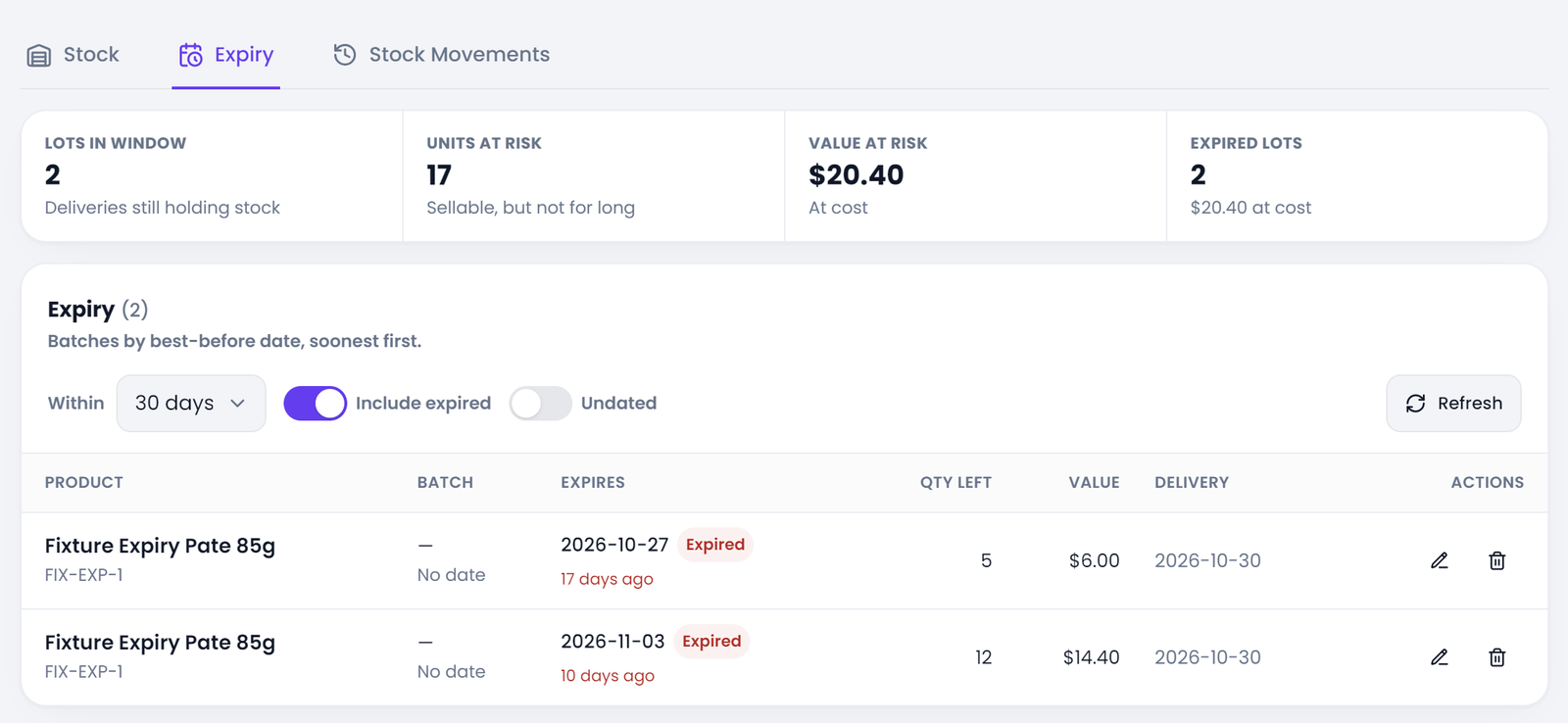
The stock screen has a second tab that re-cuts the same shelf by best-before date. It opens on a 30-day window, and the window can be set to 7, 60, 90 or 180 days. Expired stock is included by default, because it is the more urgent half of the question: still on the shelf, still counted as an asset, and due to be pulled.
Each row carries the product and SKU, the batch (production date plus the receiving document reference), the expiry date with a status chip, the days remaining, the quantity left, the value at cost and the day the delivery was booked. The days figure reads "12 days left" or "3 days ago", which is the number a manager actually plans a markdown around. Anything inside thirty days is amber, anything past its date is red.
Above the table, the figures cover the whole window rather than the page you happen to be on: batch count, total quantity, cost value tied up, expired batch count with its quantity and cost value, and how many batches carry no date at all.
That last figure has its own switch. Opening stock claimed when a product was first switched on has no printed date by definition, so it can never fall inside a date range. The switch brings those rows on screen so somebody can fill the dates in. It is off by default because an undated batch is not "expiring", it is "unknown", and mixing the two makes the screen look alarming for no reason.
At the Till: Oldest Usable Date First, Unless You Choose
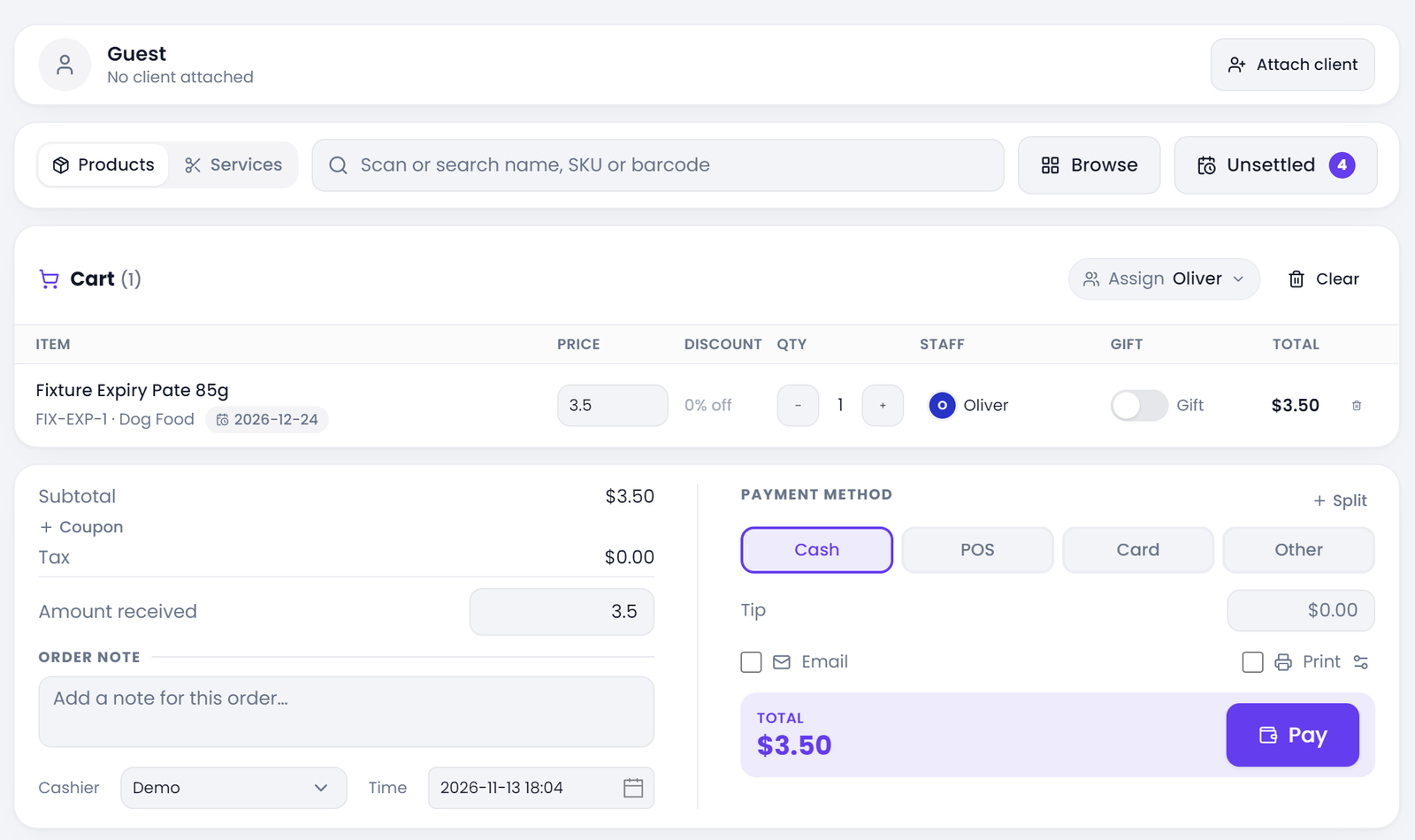
On the sales floor the batch date follows the line into the cart. A cart line for a tracked product shows the expiry of the batch it is claiming, in the same amber and red as the expiry tab, with the days left beside it.
The register picks the batch on its own, by first expired, first out (FEFO): earliest date first, skipping anything already past its date. That is the rule a good shelf is worked by, and it removes the daily argument about which bag to hand over.
The pick is a default, not a lock. Open the batch panel on the line and every delivery of that SKU is listed with its date and what is left in it. Choose a different one when the customer asks for a longer date, or when a batch three days from its date is going out at a markdown. The choice is recorded against the sale, so the ledger still knows which delivery left the building.
A single sale can draw from more than one batch. When the first batch runs out mid-cart, the next one covers the rest, and each batch writes its own line into the stock ledger. "Which delivery did this come from" survives a sale that spans two of them.
Expired batches stay untouched until somebody asks for one. Clearing short-dated stock is a decision a shop makes on purpose, so the register waits to be told rather than doing it quietly.
When Food Passes Its Date
There are three honest endings for a batch that has gone past its date, and the software keeps them apart.
Write-off is the loss. Expired or damaged goods leave the shelf at cost and land on the profit and loss as a loss. The form opens on two category cards before anything else, because the category decides the accounting: a write-off is a loss, while store use (grooming supplies, staff, the shop's own pets) is an internal transfer. Picking the wrong one moves money into the wrong report.
Naming a batch on a write-off line is optional. Left blank, the oldest expiry goes first, which is usually the right answer for the tubs at the front of the shelf. Named, the quantity is capped at what that batch still holds rather than spilling into the next one.
Return to supplier is the second exit, and it is the usual way a shop gets rid of a batch that has gone past its date: the supplier takes it back, or credits it. Supply returns are the one movement allowed to take expired batches, which is what a credit claim needs.
The third is the deliberate markdown: sold through the register with the batch picked by hand. From the expiry row itself, a shortcut opens a write-off with the batch, the remaining quantity and the cost already filled in, so pulling stock off the shelf takes one press rather than a re-entry exercise.
Correcting a Date That Was Typed Wrong
Best-before dates are copied off a box by hand at the back door. A transposed month is an ordinary mistake. Voiding the whole delivery to fix it would reverse stock that has already sold and turn one typo into a false stock history, which is a heavy hammer for a slip of the finger.
Dates are editable on the batch itself. Only the two dates: quantities belong to counts and sales, where a number that disagrees with the shelf is a physical fact rather than a data-entry slip.
Every correction is stamped with who made it and when, and that line shows on the expiry row. A shop's answer to "why does this say December" has to be answerable months later.
One check runs before the save. An expiry date earlier than the production date is refused, because a box that expires before it was made does not exist. The check compares against the values the batch would be left holding, so clearing one date to retype it does not trip the rule.
Ready to Eliminate Pet Food Spoilage?
A tub of fresh food goes off whether or not the software knows about it. What the software can do is put the date in front of you a month early, and keep the till from selling the old batch last.
Setting this up is smaller than it sounds. Start with the ten SKUs that actually carry a date: the frozen raw food, the fresh rolls, the short-dated prescription diets. Give each one its shelf life, switch batch tracking on, and book the next delivery with the printed date in the box.
Two weeks of normal trading shows whether the dates are being logged properly. The expiry tab points at the batches inside the thirty-day window, the register starts handing those out first, and the write-off form keeps spoiled stock out of the margin instead of hiding it inside a counting variance.
A 14-day free trial covers one real delivery, one sale that follows the oldest date, and one write-off, end to end. If those three match what the shelf actually did, the setup is right.
Related questions
See it on your own shop
Every module is unlocked for 7 days. Set up your services and take a real booking before you decide anything.
No credit card required · Cancel anytime