

How to Calculate Groomer Commission Rates Based on Service Types and Add-Ons?
Yes. Pawfora assigns a default commission rate to a staff role and lets you set custom overrides per service. Full grooms can pay a percentage while add-ons like nail trims pay a flat fee, each calculating automatically on the invoice.
The Short Answer: A Default Rate, Then an Exception per Service Type
A grooming menu is not one price, so it should not be one commission. A full groom on a doodle, a bath on a short-haired dog, a nail trim and a teeth brush are all worth different things to the shop, and paying the groomer the same cut on each is how you overpay on the easy jobs and underpay on the hard ones.
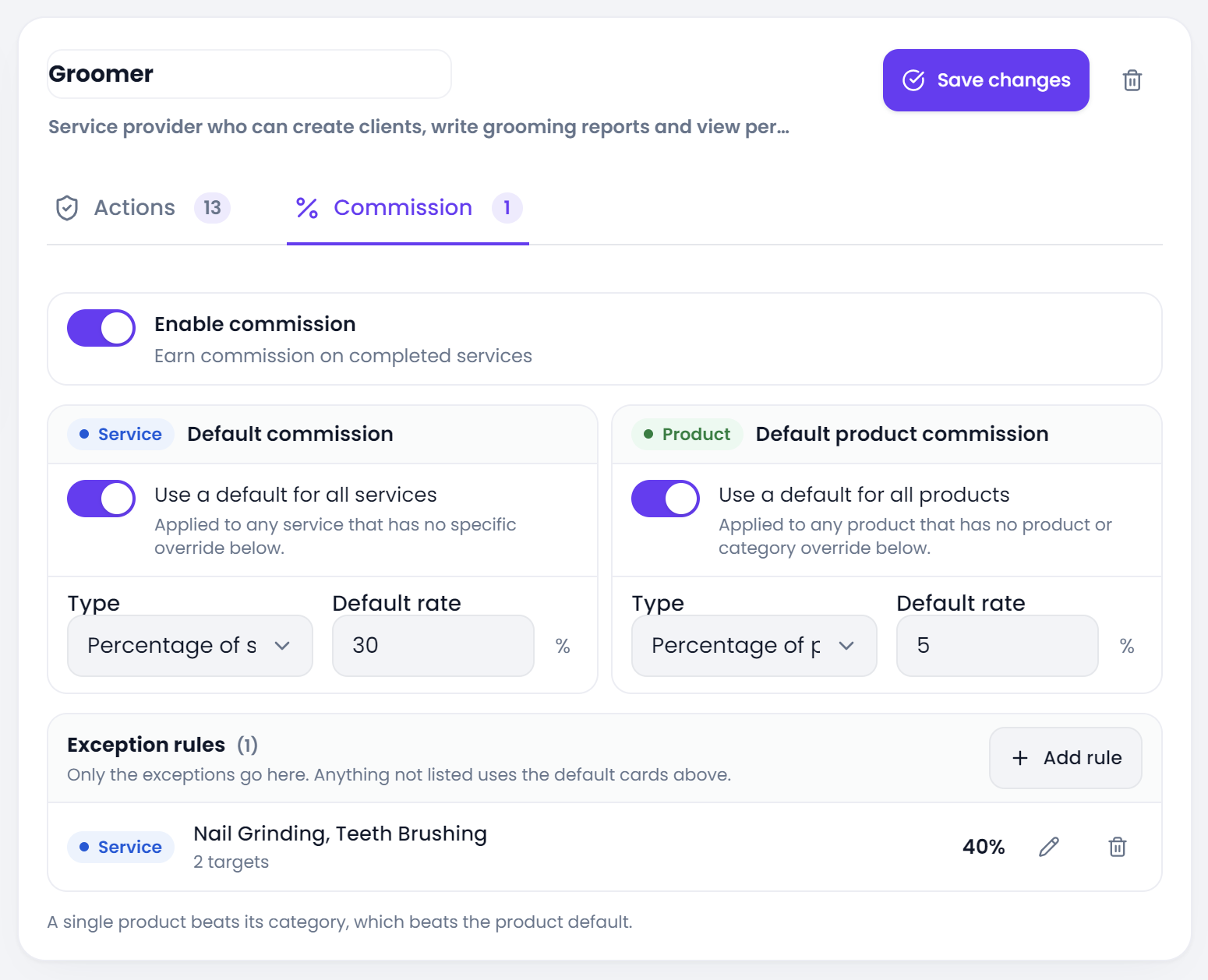
Pawfora builds commission in two layers. You set one default rate on the staff role, and every service inherits it automatically. Then you add exceptions for the services that should pay differently. A full groom can sit on the default percentage while a nail trim is carved out at a flat fee. Any service you do not carve out keeps the default.
The rate lives on the role, not on the person. Write it once against Groomer, and everyone who holds that role is paid by the same rules.
Percent for Full Grooms, Fixed for Flat Add-Ons
The two modes exist because grooming has two kinds of work.
A full groom is priced in tiers, by weight or coat. The price moves with the animal, so a percentage moves with it too. You set 45% once and never think about small, medium and large again. The commission follows the ticket.
An add-on is flat. A nail trim is a nail trim, whether the dog is a Yorkie or a doodle. Ten percent of a twenty dollar add-on is two dollars, which does not motivate anyone. That is what the fixed mode is for: a flat amount per job, predictable, and the right shape for work where the price barely moves.
You can mix them freely across a menu. One role can pay 45% on full grooms and eight dollars flat on nail trims and teeth brushes. Nothing forces the whole menu to share one mode.
One Rule Can Cover Ten Services at Once
When several services should pay the same special rate, you do not enter that rate ten times. You pick them once.
An exception rule holds a batch of services and one rate. Select the ten add-on services, type the amount, save, and it is one row on the screen. When a new add-on appears later, you add it to the existing rule rather than building a second one.
Services are picked directly, by name. There is no category shortcut on the service side, because a grooming menu is short enough that picking the ten services that matter is clearer than keeping a second category tree just for payroll.
Add-Ons Resolve Their Own Rate, Not the Full Groom's
This is where the layer earns its keep, because an add-on usually does not arrive until the owner is standing at the counter.
A groomer is closing out a full groom and the owner says "do the nails too". That nail trim is added to the ticket on the spot. It becomes its own line on the invoice, and the payroll reads it as its own line. So it resolves its own rate, not the rate of the groom it was attached to.
That is the point of the exception layer. If you left the nail trim on the default 45%, you would be paying nine dollars in commission on a twenty dollar add-on. Give it a flat five dollar rule and the pay sheet stays sane. The full groom keeps its percentage, the add-on keeps its flat fee, and the two never bleed into each other.
The Service That Never Earns a Cent
Some services should not pay commission at all, and that is a separate decision from the rate.
Every service carries a commission switch, and it is on by default. Untick it and the service still sells, still books, still counts as revenue and still earns its tips. It just contributes zero to the commission column, and it skips any weekend bonus too. This is for the services you keep on the menu for goodwill rather than margin: a redo of last week's groom, a courtesy nail clip.
The switch is per service, so it sits beside the rate rules rather than inside them. It is the bluntest tool in the box, and it is there for the handful of services you would rather not pay out on at all.
Services and Goods Are Two Separate Dials
If the shop sells retail out front and grooms in the back, the same groomer can earn on both sides of the ticket, but the two sides are configured separately.
There is a service default and a product default, and they do not talk to each other. A 45% service rate does not quietly apply to a bag of food, because a service margin and a retail margin are not the same number. Products also get their own override tiers: a rule on one product, then a rule on its category, then the product default.
The practical point: setting a generous groomer rate never leaks onto the retail shelf by accident, and turning the service dial up or down does not touch the product dial.
The Two Guardrails That Keep a Rate Honest
Two rules protect you from a number typed too fast.
A percentage commission is capped at 100 percent. You cannot, by a miskeyed 150%, pay out more than the service price. A fixed amount has no such cap, because a flat fee is a flat fee, but the fixed amount is split across the people on the line. Put a twenty dollar fixed rate on a job two groomers worked and each gets ten. If you meant twenty each, you wanted a percentage.
Neither of these is something you manage day to day. They are just the two facts worth knowing before you save a rate, because they decide what a careless number actually pays.
Set It Once, Then Read the Answer
The setup is a few minutes and it happens once. Set the role's default, add the exceptions for the add-ons and the odd jobs, untick the services you do not want to pay out on, and save.
From then on there is no month-end arithmetic. Each settled line resolves its own rate, and the pay report is a read of those lines rather than a spreadsheet you rebuild. If you want the full detail of how a line's base is calculated, the coupon share, the weekend extra and the staff split, that is its own page, and how the settlement math works covers it line by line.
Grooming shop software that does the arithmetic as it settles is the difference between paying people once a month from a number you trust, and paying them once a month from a number they argue about. Set the rates, run a free trial, and watch the next pay run come out of the till instead of the weekend.
Related questions
See it on your own shop
Every module is unlocked for 7 days. Set up your services and take a real booking before you decide anything.
No credit card required · Cancel anytime