

How to Prevent Staff Unauthorized Discounting and Manual Price Overrides at Checkout?
Yes. Pawfora turns price changes, discounts, and freebies into role-based permissions enforced directly by the server. Revoking these permissions locks price fields and blocks unauthorized markdowns while allowing normal checkouts to run seamlessly.
The Short Answer: A Permission, Not a Policy
The question assumes the answer is a rule, a policy, a talking-to. It is not. A sign taped above the register that says "no discounts without asking me first" works until the manager's day off, and then it works on whoever happens to be reading signs.
Pawfora answers the question with a permission instead. Price changes, bill discounts and give-aways are each a switch you can turn off for a role, and the software enforces the switch on the server. A cashier whose role does not hold the switch can take a normal payment, and cannot move a price. That is the whole mechanism, and the rest of this article is the detail of where the switches sit and how far they reach.
The Server Enforces It, the Screen Just Hides It
There are two places a lock can live, and only one of them matters.
The screen is the polite one. When an operator lacks the permission, the price field greys out and the discount box shows a line that reads "You do not have permission to change prices or discounts." That keeps an honest employee from walking into a wall.
The server is the one that actually says no. Every sale is re-priced against the catalogue as it is saved. The cashier's screen can echo the list price back a hundred times and nothing is flagged, but the moment a submitted line differs from the list price and the operator has no permission, the server refuses the whole bill with a 422 and the sale does not exist. A tinkered front end does not get past it, because the check is not in the front end.
That ordering is the important part: the screen hides the button for the sake of a clean checkout, and the server enforces the rule for the sake of the money.
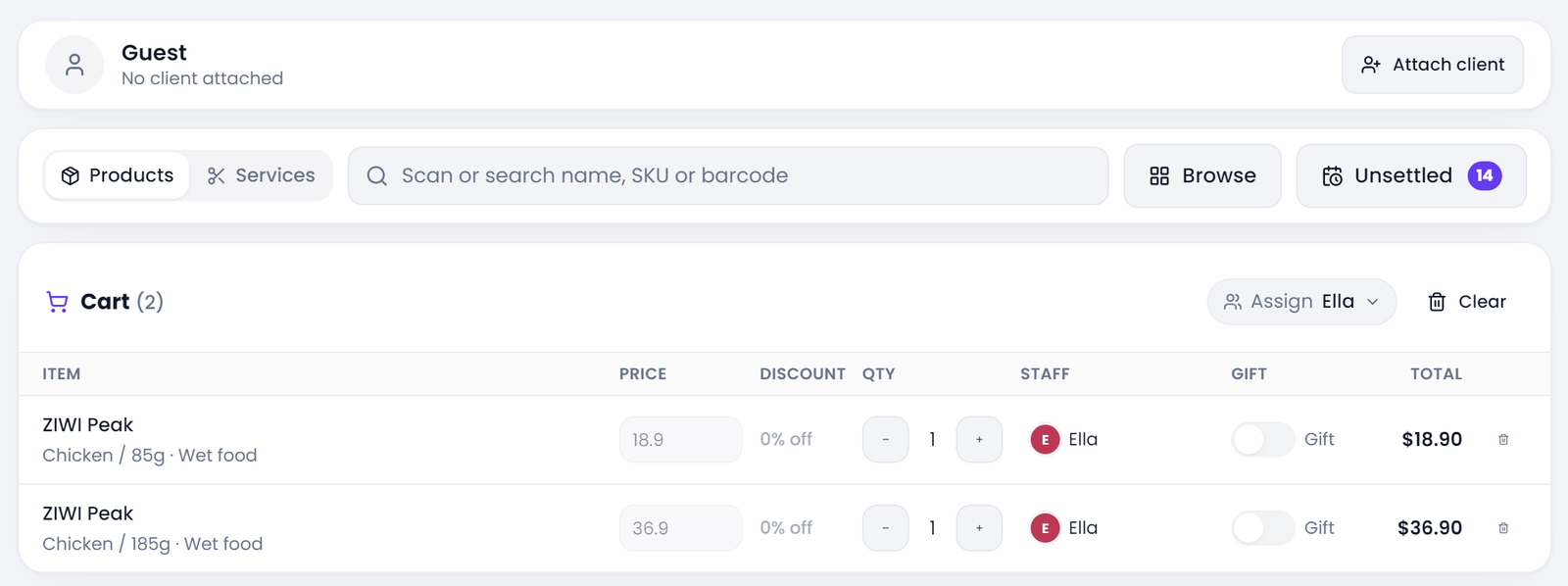
One Switch Covers the Price and the Discount
In the checkout that settles grooming and retail work, a manual price override and a whole-bill discount are the same authority, and that is on purpose.
The reasoning is blunt. If you could change the unit price of a line, you could take the same money off with the discount box instead, and gating one while leaving the other open would leave a read-only price field sitting next to an empty box that does the identical damage. So there is one permission, labelled Change price at checkout, and whoever may quote their own price may also take the same amount off the bill. Turning it off closes both doors at once.
One switch, on or off, is the whole mechanism, and there is no separate approval step to configure. That simplicity is deliberate: a lock a shop has to route through a manager every time is a lock that gets switched off by Tuesday.
Two Ways to Take Money, Two Switches
Pawfora takes money down two paths, and each path carries its own price switch. The point-of-sale register, where goods are scanned at the counter, is gated by Change price at POS. The checkout that settles booked grooming and retail work is gated by Change price at checkout. They are separate on purpose: a grooming-only shop still discounts grooms even though it never touches the retail register, and a busy retail floor can leave its register open while the settle screen stays locked.
The give-away switch, by contrast, is shared. One permission covers handing stock out for nothing across both paths, because a freebie is a freebie whether it leaves through the till or through a settled ticket.
What this means in practice is that you do not grant one giant "can touch money" flag. You grant the specific authority each job needs, on the specific screen that job uses. The price switches govern who may change the amount; how that amount is actually collected, splitting a bill across payment methods, is a separate dial on the same screens.
Giving It Away Is a Third Gate
A 100% discount and a gift look the same on paper, and a shop that thinks of them as the same thing is where the losses hide.
A discount says: this service or product is worth less than the list, here is the reduced price. A gift says: this stock leaves the shelf and nobody pays, period. The second one is its own permission, Give items away at POS, and it is deliberately not folded into the price switch. A groomer who may adjust a matted-dog upcharge still has no right to hand a bag of food across the counter for nothing, and the reverse holds too. A manager who may comp a service cannot quietly re-price a groom without the other switch.
The boundary also shows up in how the two are recorded. A gift line keeps its real list price on the record with the giveaway marked, so the revenue report still shows what the stock was worth when it walked out the door.
Owners Walk Through, Staff Inherit What You Grant
None of these locks ever slow the owner down. The owner role holds every permission by design and passes straight through, which is the one place the system refuses to be clever: an owner who set up the whole shop cannot be locked out of the till by a permission checkbox they forgot to tick.
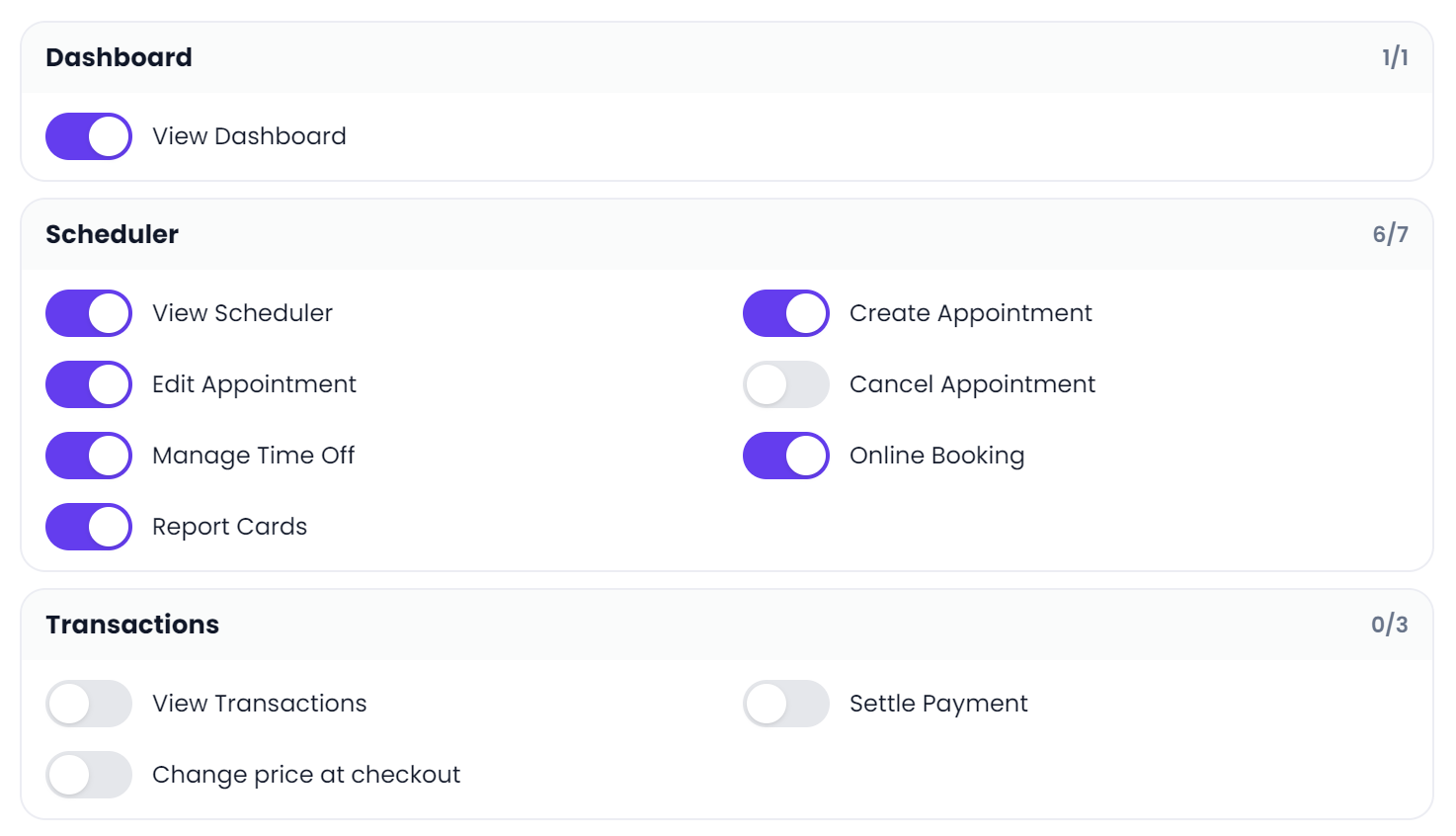
Everyone else gets exactly what their role was granted. Role management lists each permission as its own switch, Change price at POS, Change price at checkout, Give items away at POS, and so on. Build a cashier role with the register and no price switch, a groomer role with the settle screen and no discount, a manager role with everything except the give-away, and the differences hold the moment each person logs in.
When a sale is reversed, the system also records who reversed it and why, so a voided bill is not a hole in the numbers that nobody can explain later.
A shop that grooms in the back and sells food up front sets these switches once, because the till and the booking checkout are two faces of the same dog grooming shop software.
A Normal Sale Never Trips the Wire
The lock is narrow, and that is the whole reason it can stay on.
Only an actual change trips it. Scanning a bag of food, ringing a groom at the list price, taking a card payment: none of these touch the price switch, because none of them move a price. The server compares what was submitted to what the catalogue says, and an unchanged line is not an override. So locking the price does not make the front desk slower or require a manager to stand by for every transaction. It stops the two things it is meant to stop: a price typed by hand, and a markdown no one approved.
That is the trade worth naming. A permission that fired on every sale would get disabled within a week. A permission that only fires when someone actually reaches for the price stays on, because nobody notices it until it matters.
Ready to Lock Down the Till?
Close it up in three moves. Open role management, find the role your cashiers and groomers share, and switch off the two price permissions and the give-away permission. Then ring a test sale as that role and watch the price field sit grey with the hint under it. Then try to push a changed price through anyway and watch the server refuse it.
That is the point at which "please do not discount" stops being a request and becomes a fact. Your staff can still take every normal payment the shop runs on, and the money nobody meant to give away stops walking out the door. Start with a free trial and turn the switches off before the next shift begins.
Related questions
See it on your own shop
Every module is unlocked for 7 days. Set up your services and take a real booking before you decide anything.
No credit card required · Cancel anytime