

How to Record Pet Matting Severity Scores on Grooming Intake Forms?
Yes. Pawfora's health check sheet is yours to define: you pick the checks and the findings each offers. Add a "Matting severity" check with your own grades, save it as the shop default, and every pet is checked against it from then on. The groomer scores it at check-in; owners do not. It never changes the price.
The Short Answer: Build the Check Once, Use It on Every Dog
Yes. The health check sheet in Pawfora is not a fixed form with a fixed list of boxes. The shop decides which checks appear on it and what each check asks about. If you want to record how badly a coat is matted, add a check called "Matting severity", give it the grades your team actually uses, and save the sheet as the shop default. From the next pre-check onwards, that row is there for every dog, every groomer, every visit.
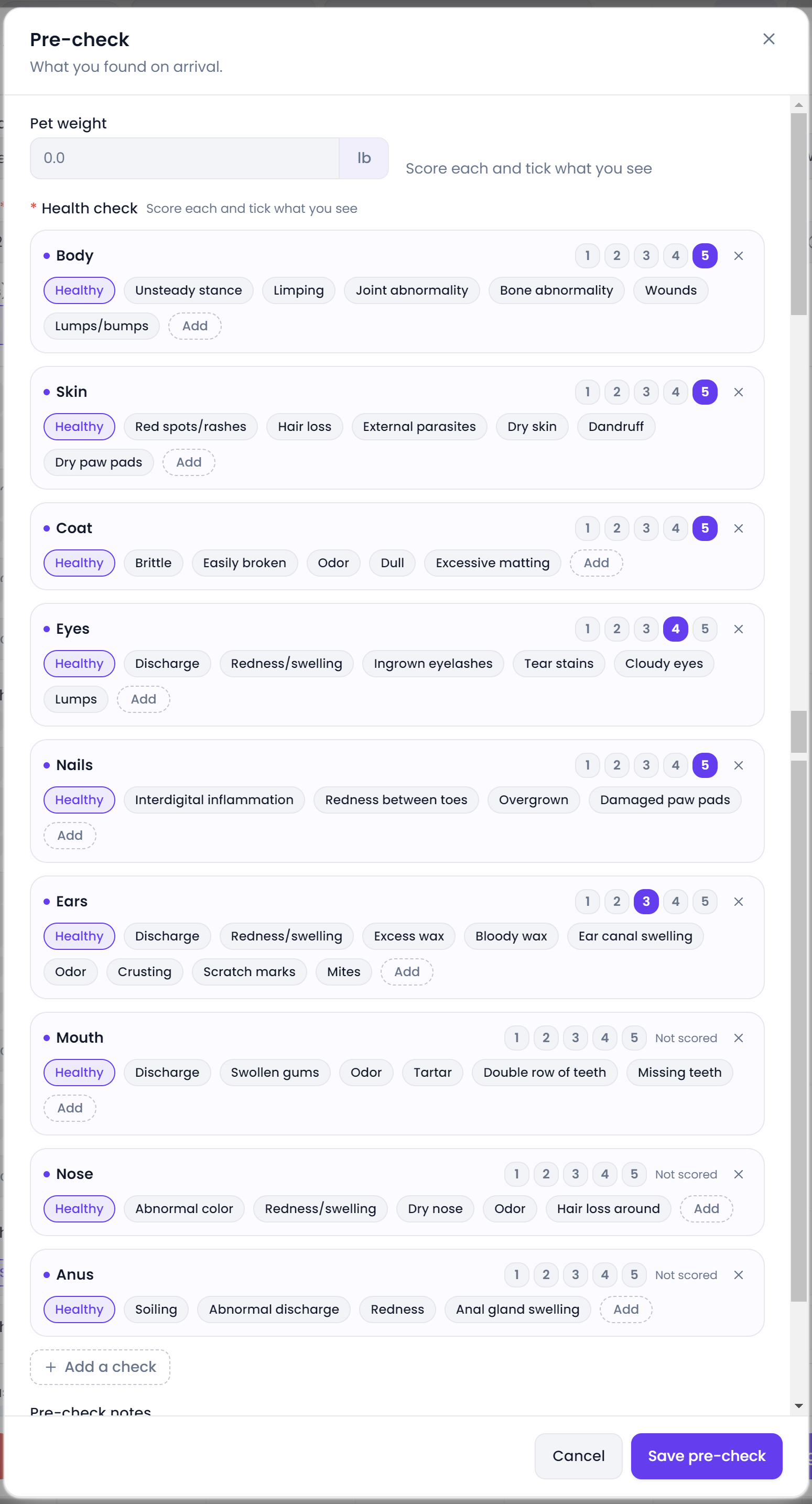
The grade is recorded by the groomer at the table, not typed by the owner at home. That distinction matters more than it sounds: an owner saying "a bit tangled" is an opinion, while a groomer writing "Grade 3, mats behind both ears and along the hind legs" is a finding, and it is the one that holds up if the de-matting fee is questioned three weeks later. The grade lives on the report card for that pet and that day, with notes and arrival photos beside it.
Your Health Check Sheet Is Yours to Define (Customizing Rows)
The sheet that ships with Pawfora has nine rows — Body, Skin, Coat, Eyes, Nails, Ears, Mouth, Nose and Anus — each with a short list of findings. Treat those as a starting point, not a standard. The feature was built because shops routinely file six or seven checks, and often want a row the built-ins do not have.
Rows you never use can be removed. New rows can be added under any name you like, and new findings can be added to any row, including wording nobody has typed before. Remove the ones that do not apply to your work, add the ones that do, and the sheet becomes yours rather than ours. Custom wording is stored exactly as typed, so a check you invented keeps its name through a reload, onto the printed report and into the customer's view of it. Built-in names get translated into the shop's language; your own names render as you wrote them.
The save is what makes it a routine rather than a one-off. "Save as default" writes the whole sheet to the shop's settings, and it needs the "settings:manage" permission — changing what every colleague starts with is an owner's call, not something the person filing one dog's report should do by accident. "Restore built-in" drops the customisation and brings the nine original rows back. An empty sheet is not saved at all, so there is one reset path rather than two. Blank and duplicate check names are cleaned out on save, and every row keeps a Healthy finding whether you added one or not.
Setting Up a Matting Severity Check Step-by-Step
Here is the whole setup, and it takes one visit's worth of attention.
Open a grooming report or the calendar's Check-in step. On the pre-check block of your pos system for dog grooming, hit "Add check" and name the row "Matting severity" — or "Coat matting", or whatever your price list already calls it. Then add findings to that row with the "Add" button on the row itself. Most shops settle on something like None, Light tangling, Moderate matting, Severe matting, Pelted. If your service menu talks in grades, use Grade 1 through Grade 5 and keep the wording consistent with the price list.
Now save it shop-wide. Click "Save as default" and confirm. That is the step people miss: adding a row while filling in one dog's report changes that report only. Saving the sheet changes what the next pre-check starts with, for everybody.
The saved sheet holds structure only — check names and their findings. It never holds a score or a ticked finding, because those belong to one animal on one day. Changing the sheet does not rewrite old reports, and a finding recorded before you changed the sheet still shows on the report it belongs to. Scores and findings are stored on the grooming report card itself.
One Saved Sheet for Every Pet on Every Visit
The saved sheet is read wherever a fresh pre-check is started. There are two entry points: the full report form, and the calendar's Check-in step that opens when an animal arrives. Both build a blank sheet from the shop's rows, so nobody has to rebuild the matting check each morning. Check-in waits for the shop's sheet to load before it draws the form, so the rows on screen are the ones the shop actually saved rather than a list left over from earlier in the session.
On a booking with several pets, each animal gets its own blank copy of that sheet, keyed to its pet. A three-dog household means three independent sets of grades, not one set copied across. Check-in stays optional: if nobody scores, ticks, weighs, writes or photographs anything, the animal can still be checked in without an empty report being created.
What is fixed is the shell around the rows, not the rows themselves. Every row carries the same 1-5 score buttons, the same Healthy resting state, and the same notes and photo slots beside it. Which checks exist, and what each one asks about, is the part you own.
Scoring Rules: 1–5 Scales, Graded Findings, and Team Consistency
The system does not say which end of the scale is good. There is no label reading "1 = clear, 5 = severe", and no label reading the opposite. The interface says "Score each and tick what you see", and leaves the rest to the shop. A four on Coat means whatever your team agreed a four means.
Decide that in writing before the first busy Saturday. Pick the direction, write one line for each grade, put it where groomers can see it, and use it on every row so a three on Coat and a three on Skin describe the same degree of trouble. Otherwise two groomers will score the same dog differently and the number stops being comparable across visits.
With a graded matting row you have two scales sitting on the same sheet — the words and the numbers. Pick one as the record. Either let the graded finding carry the severity and leave the row unscored, or define the numbers to match the words and say so in your notes. Two scales that disagree on one report are worse than one scale with a clear definition.
Scoring is optional. Click a number to set it, click the same number again to clear it, and the row goes back to "Not scored" rather than to zero. A zero would be a verdict nobody gave, and reports filed before per-row scoring existed come back unscored too, because the system will not invent a score for a historical visit. A row counts as a concern the moment it holds anything other than a lone Healthy, and that flag comes from the findings, not the number: score a five and tick nothing, it reads as normal; tick "Severe matting" and leave it unscored, it is flagged.
Pre-Check Notes vs. Care Notes: Where the Mats Are Located
A grade says how bad. It does not tell the next groomer where to start. Pre-check notes hold what was found before the animal got wet: "mats behind both ears and along the hind legs, skin clear, no redness". Care notes hold what was done and what the owner should do next. Keeping the two apart means a report that says "she arrived matted" cannot later be overwritten by one that says "matting removed", which is how a before-and-after record should read.
Before and after photos sit alongside those notes, in separate sets, and the emailed copy of the report prints both. For a dispute about a de-matting fee, a photo of the coat on arrival beats any number on a sheet. The weight taken at check-in is written back to the pet's profile as the most recent weighing, in the shop's own unit; a blank weight leaves the profile alone.
What the Owner Sees in Their Report & Software Boundaries
The owner can open the report in their store account. It lists each check by name — custom ones included — with its findings and the score out of five, or "Not scored" where nobody gave one, then the pre-check notes, care notes and before and after photos. Emailing that report is a switch at save time, and it goes out through the shop's own mail settings rather than a shared sender.
The score itself does very little else, and this is worth being blunt about. It does not add a de-matting fee, choose a service, extend the appointment or change the invoice. There is no threshold that fires an alert when a coat scores badly, no chart plotting a dog's matting across six visits, and no report listing every matted dog in the shop. Reminders are written and sent by a person. Reading a trend means opening past reports one at a time.
That is a real boundary, but it does not change the answer to the question. Recording the grade consistently for every dog is a setup job you do once. What the shop does with the number afterwards is still a person's decision.
Summary & Next Steps
Yes, you can record matting severity, and you do it by defining the check yourself rather than hunting for a field with that name. Add a "Matting severity" row, give it grades your team and your price list agree on, save the sheet as the shop default, and every pre-check from then on starts with that row for every pet.
The practical order is short. Agree in writing what one to five means — or decide to leave the row unscored and let the graded findings be the record. Build the row and save it as default. Tell every groomer to name the locations in pre-check notes and take arrival photos when the coat is bad. Then pull up three reports from last week and check whether two groomers would have graded the same dog the same way. That comparison, not the field itself, is what makes the number useful.
Related questions: whether a matting score changes the price, how pre-check notes differ from care notes, how to read a pet's report history.
Related questions
See it on your own shop
Every module is unlocked for 7 days. Set up your services and take a real booking before you decide anything.
No credit card required · Cancel anytime