

Why Do Generic POS Systems Fail to Track Pet Weight Changes and Grooming Health Logs?
Generic POS records a sale, not an animal. Pawfora keeps a weight snapshot and a scored nine-area pre-check on every grooming report card, then writes the newest weighing onto the pet's profile. History lives in the cards; reading the trend is still your job.
The Short Answer: A Till Has No Field for an Animal
A till is built around a product. Every row it writes has the same three things on it: what was sold, how many, for how much. That shape works for a bag of food and it works for a shampoo bottle, and it has nowhere to put "Biscuit weighed 14.2 lb today and his ears looked worse than last time."
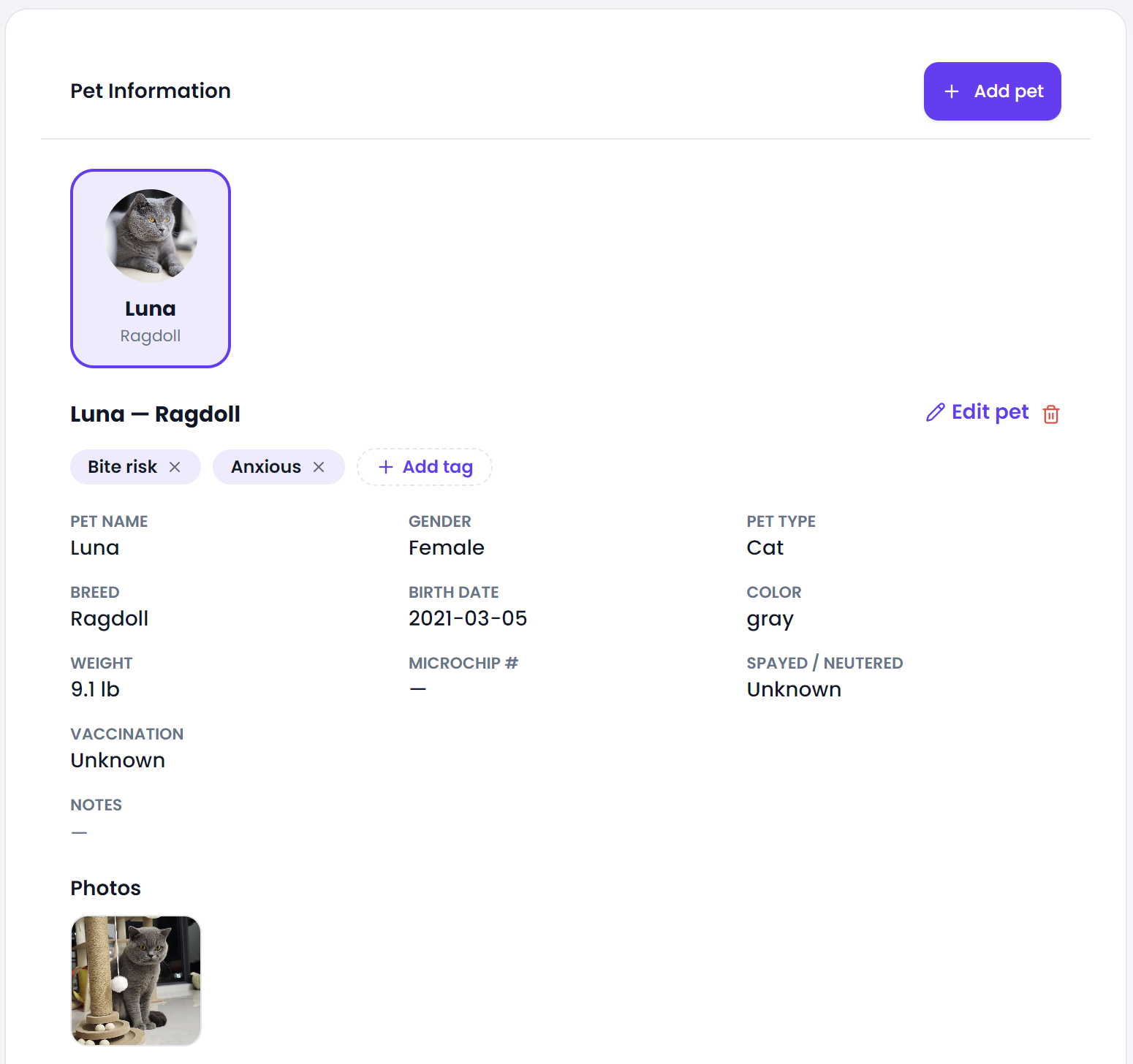
Pawfora starts somewhere else. The pet is a record of its own, with a species, a breed, a date of birth, a microchip number and a weight, and the grooming visit is a record that hangs off that pet. Weight and health findings are not squeezed into a note field on a receipt. They are columns with their own types, which is the whole difference.
Why Weight Has Nowhere to Go in a Generic POS
Three things get in the way, and none of them are fixed by adding a bigger notes box.
The first is the entity. A generic system's customer record describes a buyer: name, phone, maybe a loyalty balance. It does not describe a patient. A household with two dogs and a cat is one customer to a till, so there is no place to hang three separate weight series even if you wanted to.
The second is that free text is not data. You can type "12.4kg" into a note. You cannot sort by it, convert it, chart it, or notice that it dropped two kilos since March. Whatever you write stays exactly as searchable as a sentence scribbled on a paper file, which is to say not at all.
The third is that a weight is a measurement taken at a moment. It only means something next to the date it was taken and the animal it was taken from, and a transaction row has neither. A pos system for dog grooming has to carry the animal as a record of its own. The till remembers what you sold without any help from you. The number it will never remember is what the dog weighed that morning.
What Pawfora Records Instead: A Weight Snapshot on Every Visit
Each grooming visit produces a grooming report card for one pet, and that card carries the weight taken at the table along with the unit it was taken in. The weight is typed by hand, keyed into the report form next to the date, and stored to two decimal places.
That one number then shows up in three places without anybody retyping it. It sits in the facts line of the report itself, next to breed and age. It appears on the printable sheet and in the emailed report when you switch sending on. And it appears in the customer's own online account, on that visit's report, in whichever unit you recorded it.
The unit travels with the value rather than being assumed. Enter 6.5 in kilograms on one visit and 14 lb on the next and both stay honest, because the card remembers which was which.
The Pre-Check: Nine Body Areas, Scored 1 to 5
Weight is only half of what a groomer notices. The other half is what they see while the dog is on the table, and Pawfora gives that a shape instead of a blank box.
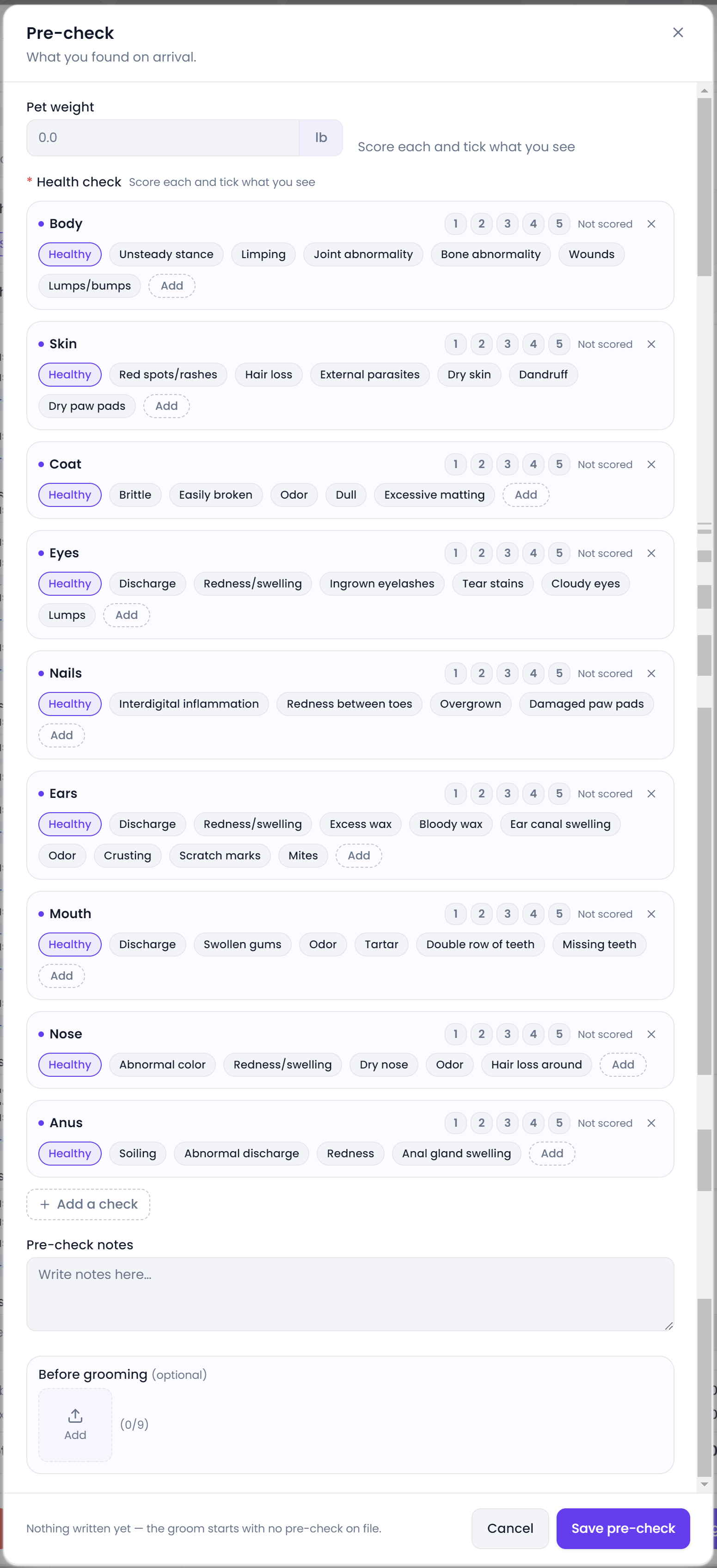
The pre-check sheet covers nine body areas: body, skin, coat, eyes, nails, ears, mouth, nose and anus. Each one offers "Healthy" and a list of specific findings, so ears can be marked discharge, excess wax, crusting, mites, or any combination of them. If your shop looks at something the list does not cover, you add your own area and it behaves like the rest.
Each area also takes a score from 1 to 5. Scoring is optional and a row left alone stays unscored rather than defaulting to a number somebody did not choose. The flagging rule is deliberately blunt: an area counts as a concern the moment it holds anything other than a lone "Healthy". One tick on "excess wax" and that card is marked, even if the ears scored a 4.
Alongside the scored sheet there are two free-text blocks, and they are separate on purpose. Pre-check notes are what you found before you started. Care notes are what the owner should do about it afterwards. Mixing them is how a report ends up telling a client to monitor a problem it never mentions finding.
How the Latest Weighing Becomes the Pet's Baseline
The pet profile carries one weight, and it is the current one. Whenever a report card is saved with a weight and bound to a pet, that value is converted into your shop's default unit and written onto the pet record.
So the profile always reads as today's number, in the unit you work in. Enter pounds on the card while your settings say kilograms and the profile takes the converted kilograms, not the raw figure. Older values are not destroyed; they stay on the cards they were taken at.
One guard is worth knowing. Clearing the weight on a card does not blank the pet. An empty weight is skipped rather than written as zero, so editing a report cannot quietly turn a 32 kg dog into a 0 kg dog.
Reading the Weight Trend: What You Get vs. Spreadsheet Exports
Here is where I would rather be plain than sell you something. Pawfora keeps the series. It does not draw it.
The report card list shows client, service, date, pre-check and actions. There is no weight column on that list and no chart anywhere in the system. Nothing computes a delta between two visits, and nothing raises a flag when a dog loses or gains past a threshold you set.
What you get instead is search and one filter. Type a pet's name into the search box and the list narrows to that animal's cards, newest first, each with its weight inside. A second filter shows only the cards where the pre-check flagged something, which is often the faster way in. On a dog that comes in every six weeks, reading four or five cards down takes under a minute. On a dog you have groomed forty times it is a longer job, and if you want a plotted curve you are exporting to a spreadsheet.
That is a real gap, and it is worth weighing against the alternative, which is having no series at all.
Where Weight Touches Pricing: Tiered Grooming Services
Weight is clinical, and it is also how a lot of grooming gets priced. A service in Pawfora can be sold in tiers defined by weight: Small, Medium, Large, or a literal range like "0-10kg". The tier is picked at booking or at the till, and the price follows the tier.
Being straight about the boundary here: the system does not read the pet's weight and choose the tier for you. You pick it. The pet's weight sits right there in the profile while you do, but the connection between the two is your judgement, not a rule in the software. Shops that want the number to drive the price automatically will not find it here.
What This Is Not: Groomer Observations, Not Veterinary Records
The pre-check is what a groomer sees while working: skin, coat, ears, teeth, gait on the way in. It is not a diagnosis, there are no diagnostic codes, no medication records, and no link to a vet practice. When a finding looks like something, the right move is still a phone call to the owner and a referral, and the report card is the evidence you hand them.
Two more limits, since they come up in every demo. There is no scale integration, so the weight is only as accurate as whoever typed it. And before-and-after photos help enormously when a finding needs describing to an owner who was not in the room, but nothing measures or compares them.
Summary & Next Steps
A generic till fails at this for a structural reason: it has no animal to attach anything to. Pawfora's answer is one report card per pet per visit, carrying a weight with its unit and a scored pre-check across nine body areas, with the newest weighing pushed up onto the pet profile.
If you take one thing from this, take the weighing. Decide that every groom gets a number, even a rough one, and six months of cards later you have the thing no till could ever give you: a record of how that animal has changed.
Related questions: how pet vaccination records and expiry dates are tracked, how behavioral notes and medical history are stored on a pet, whether grooming report cards can be emailed to owners automatically.
Related questions
See it on your own shop
Every module is unlocked for 7 days. Set up your services and take a real booking before you decide anything.
No credit card required · Cancel anytime