

Can Pet Store Software Automatically Send Re-Booking Reminders 4–6 Weeks After a Groom?
Pawfora writes the re-booking reminder for you at checkout. Each service carries its own interval in days, so a 4-week tidy and a 6-week full groom run side by side. The reminder waits in a pending list with the message already written, and someone clicks send.
Every grooming shop already knows when the dog is due. The knowledge was never the problem. Somebody has to remember it on the right day, and that is the part that fails. The client who came every six weeks for two years quietly stops coming, and nobody notices for four months because the cycle lived on a whiteboard that got wiped or in one groomer's head until she left.
Software can hold the remembering. Whether it should also do the asking is a different question, and in Pawfora the answer is: half automatic, and deliberately so.
The Short Answer: The Reminder Writes Itself, the Send Is Yours
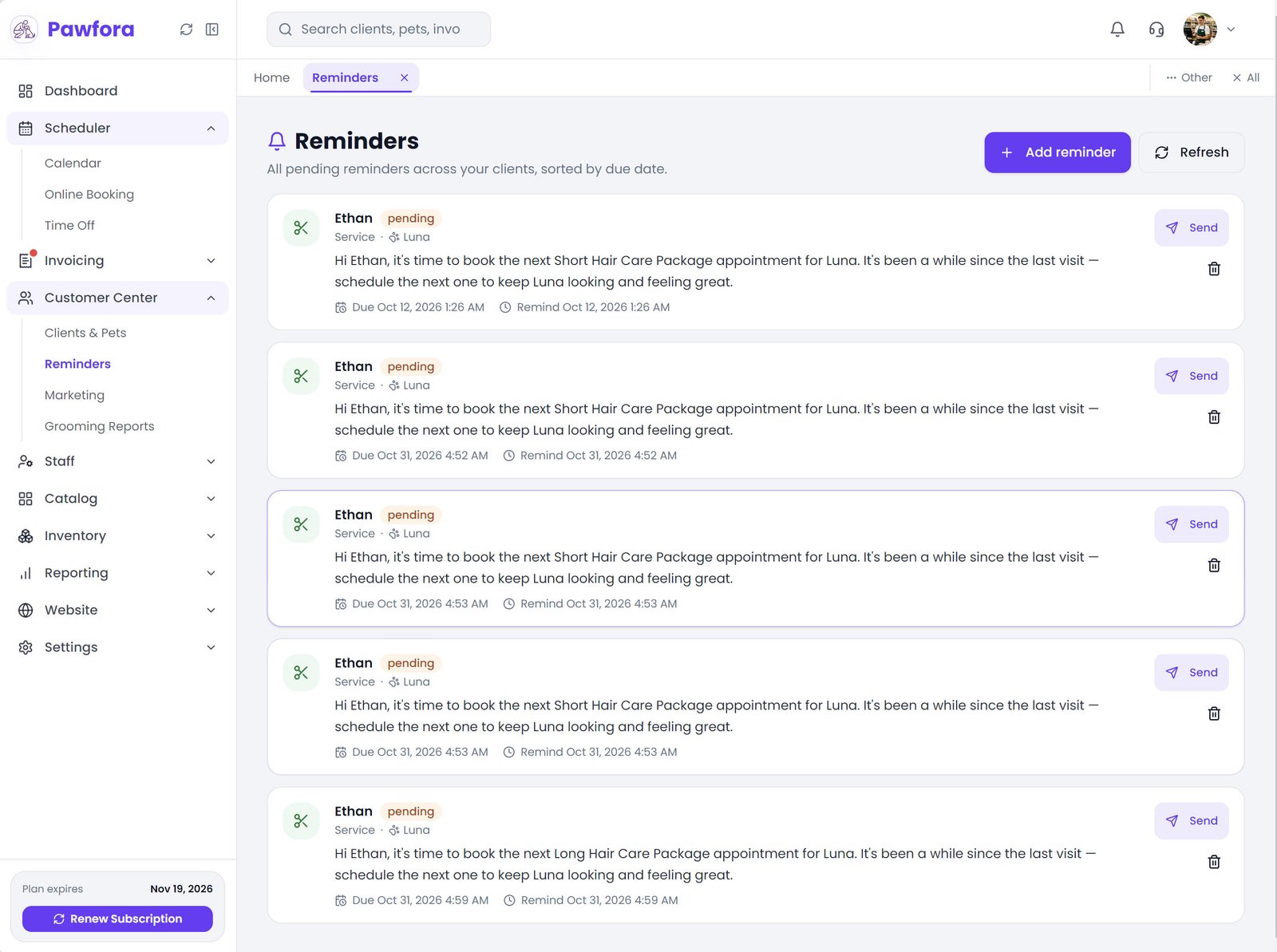
When an appointment is settled, Pawfora looks at the services on that ticket. Any service with its reminder switched on produces one reminder, dated the interval out from that moment, with the message already written and the pet attached. It lands in a pending list, not in an outbox.
Nothing then sends it. There is no nightly job that empties the queue while you sleep, and no setting that turns one on. A person opens the list and clicks.
That split is the honest answer to the word automatically. The reminder is created by the system and delivered by a human, and the rest of this page is about exactly what each half does.
How the 4-to-6-Week Interval Is Actually Set
The interval lives on the service, not in a global setting. Open the service, switch on the next service reminder, and give it a number of days.
The count starts at the checkout, not from a future appointment, so the arithmetic is plain: 28 days for four weeks, 35 for five, 42 for six. The field opens at 7 when you first switch it on, which is a useful default for a nail trim and a wrong one for a groom, so change it before you save.
Per service is the only level that makes sense. A face-feet-tail tidy on a doodle comes back in four weeks. The full groom on the same dog runs six. A hand-stripped terrier coat is eight or twelve. One shop-wide number would be wrong for almost everything on your price list.
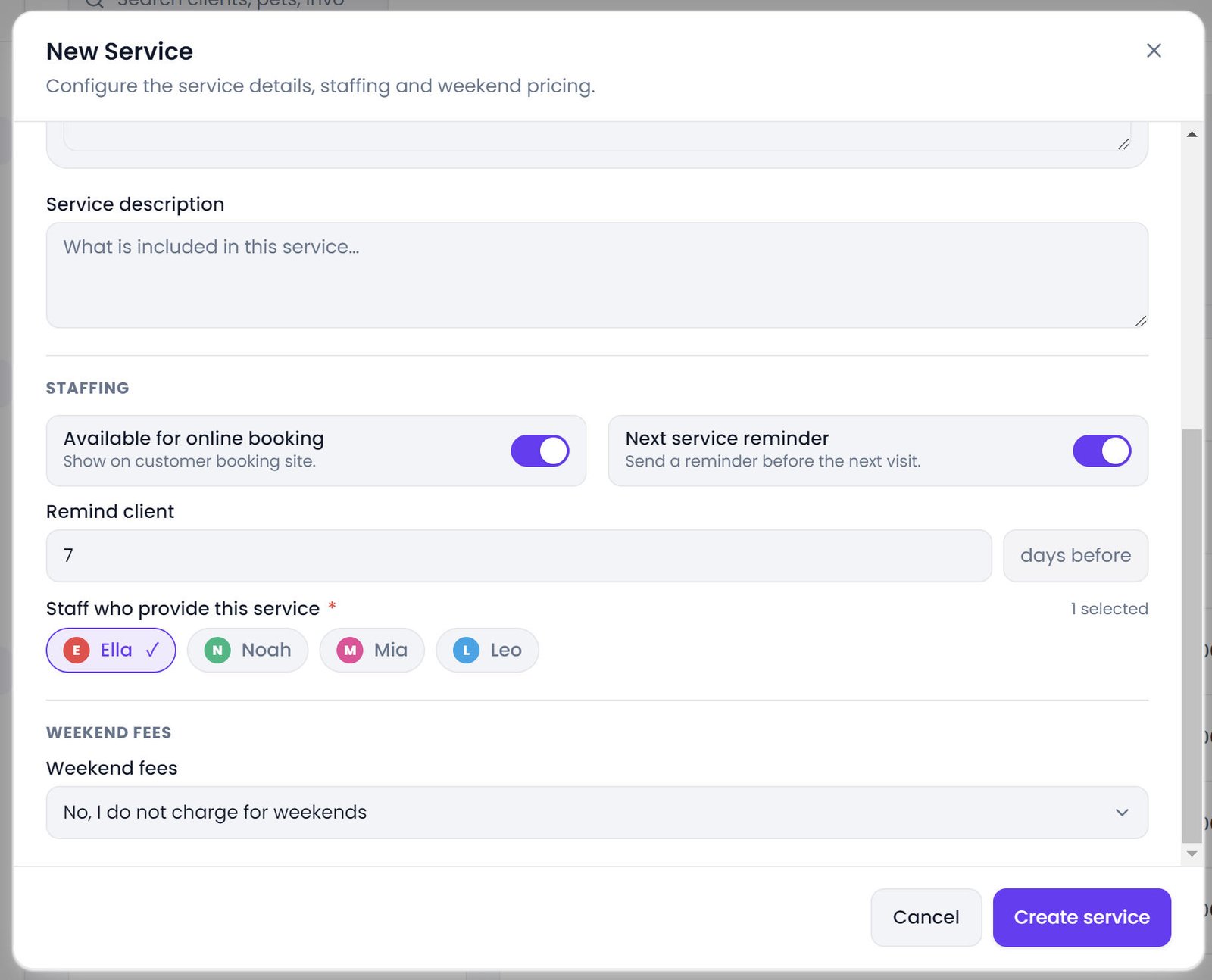
One thing worth knowing about that number: changing it only affects checkouts that happen afterwards. Reminders already written keep the date they were given, so tightening a cycle does not retroactively pull this month's queue forward.
Two Dogs, Two Dates: How Multi-Pet Visits Behave
The reminder is written per service line, against the pet that line was booked for. A household that brings in two dogs for the same groom on the same morning gets two reminders, each naming its own dog, each sitting separately in the queue.
That is the behavior you want, and it is worth checking on your first multi-pet checkout rather than assuming. Households are where rebooking software usually goes wrong, because a system that thinks in customers rather than in pets sends one message about the wrong animal and quietly trains the client to ignore you.
What the Reminder Says, and How Much of It You Can Change
The generated message is short and specific. Word for word, with the client's name, the service and the pet filled in:
"Hi {client name}, it's time to book the next {service} appointment for {pet}. It's been a while since the last visit — schedule the next one to keep {pet} looking and feeling great."
The title is the service name, and the subject line is "Service reminder". The email is that text and nothing else. No banner, no booking button, no tracking pixel. It goes out through the shop's own SMTP, under the shop's name.
You cannot edit a generated reminder. There is no edit action for it, only send and delete. If you want different wording, delete it and write the reminder yourself from the client's record, where you can also pick other types like vaccine or deworm and set your own date. A hand-written reminder with no send date, or one dated in the past, sends the moment you save it.
That is also how you get a booking link into the message. The automatic text carries none. Paste your booking page URL into a reminder you wrote and the owner has one tap between reading it and booking.
Where the Reminder Waits Until Somebody Sends It
Because the reminder is born attached to a settled invoice, the queue sits next to the money rather than in a marketing tool. A shop that already runs its day inside its dog grooming billing software never has to open a second app to keep the rebooking cycle alive.
There are three places it turns up. The dashboard carries a compact list of the reminders due today or earlier, oldest first, each with its own send button, which is the one most shops work from. The full queue is the reminders workspace under Customer Center, every pending reminder across every client sorted by due date. And each client's own profile has a reminders tab with just theirs, which is where you look when somebody phones.
Sending takes the row out of the pending lists and stamps it with the time it left. Voiding the invoice instead removes the reminders it produced outright, because they only existed to nudge the client back after a visit the ledger no longer counts.
Why Nothing Sends Itself Overnight
The only scheduled job in the whole application deletes website analytics older than 90 days, at twenty past three in the morning. There is no reminder cron, no queue worker, no drip sequence, no second nudge if the first one is ignored.
Part of that is a deliberate call. A message that leaves your shop at three in the morning can be wrong in ways you cannot take back: the wrong pet in a two-dog household, a client who asked to be left alone, an owner whose dog died in the spring and who will remember that you did not. The click is the checkpoint. The person sending it sees the client's name and the actual words before they go.
The cost of that decision is real, and it falls on you: the queue does not empty itself. It needs ten minutes with the list on a fixed day, working oldest first. That is more reliable than any reminder system I have seen, and it takes about as long as wiping the whiteboard did.
The Reminders That Never Go Out (Error & Opt-Out Handling)
A reminder that cannot be delivered does not sit there looking healthy. It changes status and prints the reason, so the list doubles as a work queue rather than a black box:
- No email on file. Marked failed, with that reason on the row.
- Client switched reminders off in their email preferences. Marked cancelled, not failed, because nothing went wrong. New clients start opted in, and older records were filled in when the preference was introduced, so this is the exception rather than the rule.
- The shop's SMTP is missing or incomplete. Marked failed with "Email is not configured" — a settings job, not a client job.
- Already sent. The request is refused outright, so a double click cannot send twice.
What Pawfora Does Not Do Here
Email only. There is no SMS or WhatsApp channel in the product, so a client who only reads texts will not see the reminder.
No delivery confirmation beyond the send time. The record knows when the message left and nothing after that. No opens, no clicks, no replies.
No escalation. If the client ignores it, nothing follows up. The next thing that happens is a person noticing the gap.
And no customer-side view. Reminders are a staff worklist; the customer portal shows grooming reports and invoices. The client's experience of a reminder is the email, full stop.
Summary & Next Steps
Turn the switch on for the two or three services that actually drive your diary, and give each one a real number of days: 28, 42, whatever the coat demands. Leave it off for the rest, because a queue full of nail-trim nudges is a queue nobody works.
Then pick the day. Monday morning, oldest first, dashboard list, ten minutes. Check the failed rows while you are in there, since a failed row usually means a missing email address that one phone call fixes permanently.
If you want a booking link or different words in the message, write those reminders by hand. The automatic one is deliberately plain: it exists so that the date is never forgotten, not so that it can speak for your shop.
Related questions
See it on your own shop
Every module is unlocked for 7 days. Set up your services and take a real booking before you decide anything.
No credit card required · Cancel anytime