

How to Send Automated Post-Grooming Care Instructions and Photo Updates to Pet Owners?
Pawfora sends the post-grooming update as one report per pet: before and after photos, the groomer's care notes, and scored pre-check findings, emailed from the report screen with a single switch at save time. The owner can also read it in their store account, and the next-visit reminder is queued at checkout.
The handover is the worst moment for information. The owner is at the counter, the dog is pulling toward the door, someone is paying and someone else is asking about Saturday. You have forty seconds to explain that the coat needs brushing out in three days, that the ears looked a little waxy, and that if the scratching continues it is worth a vet visit.
Nobody remembers all of that. So it goes into a notebook, or nowhere, and a week later the owner calls to ask whether the shampoo you used is safe for puppies.
The fix is not a longer conversation at the counter. It is sending the details home with the photos, in a form the owner can open on the sofa that night.
The Short Answer: One Report Per Pet, One Switch To Send It
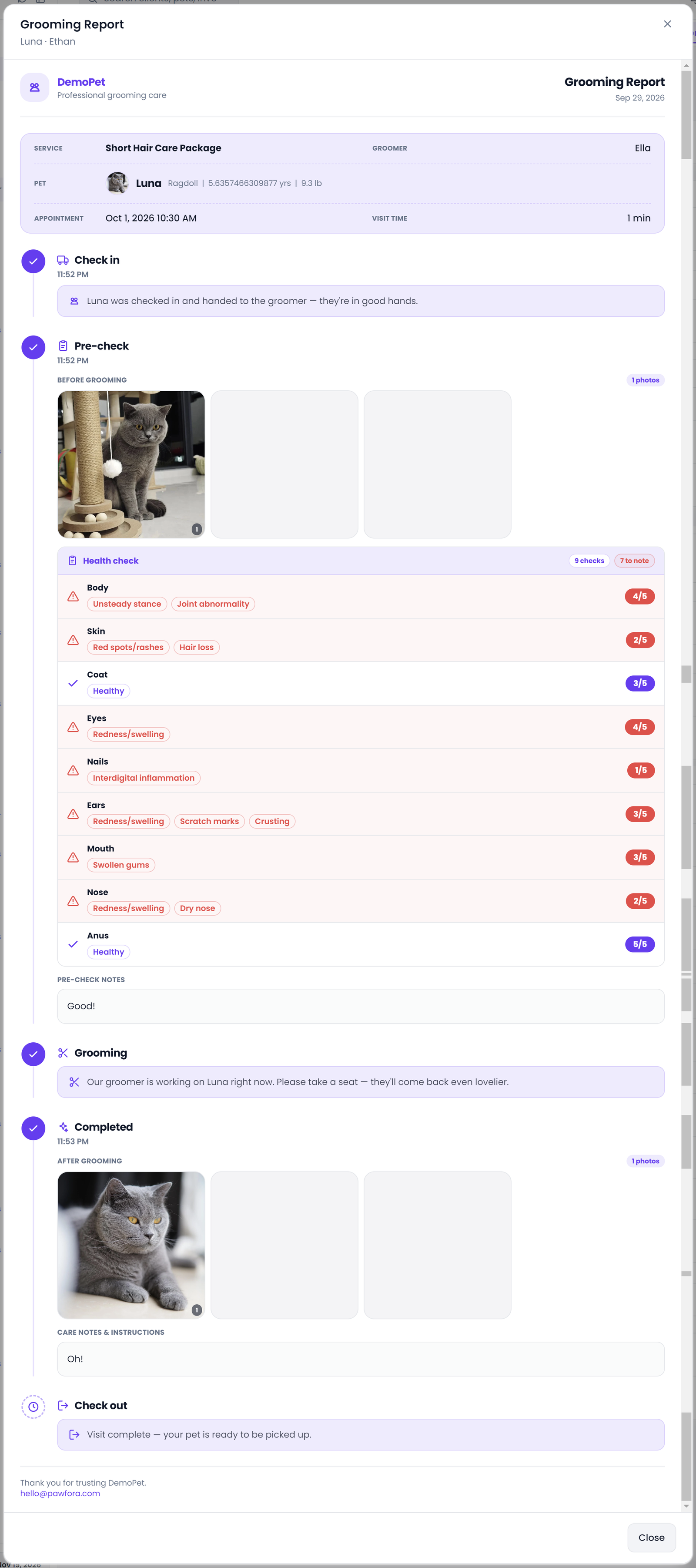
Every completed groom can carry a grooming report: before and after photos, what the groomer found on arrival with a score for each area, and the care notes for the next few days. When you save the report, a switch decides whether that report goes out by email.
The same report is also waiting in the customer's account on your website, so the information does not live only in an inbox. And the reminder for the next visit is created at checkout, from the service itself.
Three parts, one record. That is the whole design.
What Actually Goes Out in the Customer Email
The email is your shop's, not a generic template with your name pasted into it. The header carries your store name and the pet's portrait.
Below that, the visit is told as a timeline with five stages: check in, pre-check, grooming, completed, check out. Each stage prints the time it happened. Check out is read from the settled invoice, so it stays marked as pending until the money is taken, which is the honest way to draw it.
Under pre-check, two things:
- The before photos, in a grid of up to six.
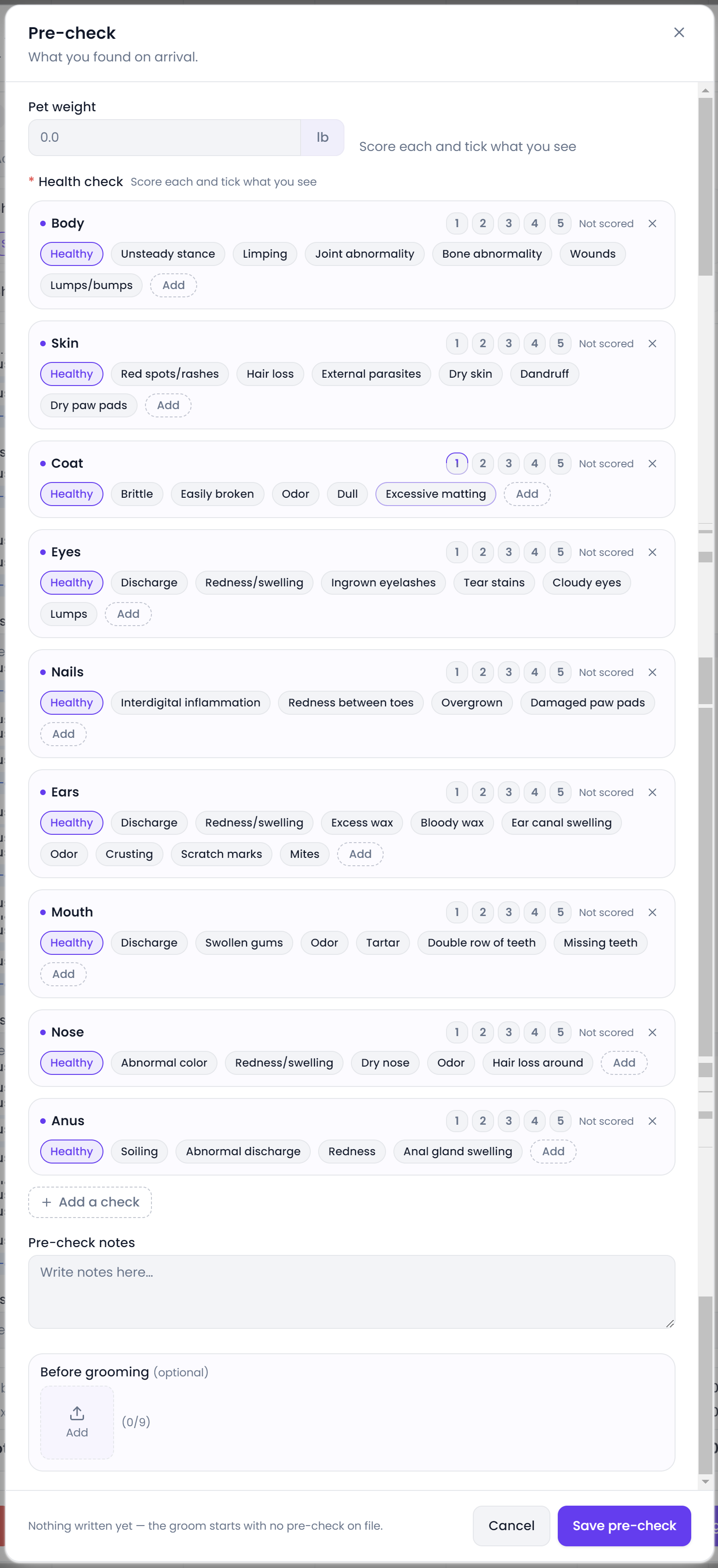
- The scored findings. Each area the groomer checked gets its own line, with the findings as short tags and a score out of five. A concern row is tinted so it does not get skimmed past. An area nobody scored reads "Not scored" rather than a zero that was never given.
Under completed, the same for the other side: after photos, and the groomer's notes in their own words.
The footer has your contact email and phone, plus one button: view the full report. That link goes to the customer's account on your store site.
Where the Care Instructions and Pre-Check Notes Come From
On the report form there is a text field labelled care notes and instructions. That is the whole mechanism.
The groomer types what this dog needs over the next few days. Brush the ears out, keep the cone on for two nights, do not bathe for a week, watch the spot on the left flank. It goes out as written, in the same words the groomer would have said at the counter.
There is no library of canned aftercare scripts and no generator writing them for you. That is a deliberate limit rather than a gap. Advice for a double coat in December is not advice for a summer puppy clip, and a template that pretends otherwise is how shops send instructions that are simply wrong for the dog.
The pre-check notes are a separate field, and they matter just as much. Those are what the groomer saw when the dog arrived: the mat behind the ears, the sore paw, the note that the last visit ended early. The owner reads the two blocks side by side, condition on arrival and work done, which is the part of the report that stops arguments later.
Who Sends It, and When: Honest Human Control
This is the honest answer to the word automated, and it is worth being precise.
The switch sits under the care notes field. It is off by default. When it is on and you save the report, the email goes out once, for that pet, on that visit. When it is off, the report is saved and nothing is sent. You can turn it on next week and send it then, which happens more than you would think when a groom finishes after closing.
What does not happen: nothing on a timer, nothing overnight, nothing that fires days later on its own. The product has no scheduled mail at all. A report email is a decision a person makes at the moment they save a report, and I would rather say that plainly than let the word automated imply a queue that does not exist.
Two details that follow from that. There is no send log: the report does not remember that it was emailed, so saving again with the switch on sends a second copy. And if your shop's mail settings are not configured yet, the save still succeeds while the email quietly goes nowhere. The system does not stop you or warn you, which is the one place this flow can disappoint you if you set it up in a hurry.
What Pet Owners See in Their Online Account
The report also lives on your store website, in the customer's own account, under grooming. They see a list of visits per pet and can open any one of them: the same timeline, the same before and after photos, the same notes and scores.
The account is activated by a single-use link you send when the customer is created. They click it, set a password, and from then on the visit history is theirs to browse without asking you for anything. They can also see their pets, their bookings and their orders in the same place.
If a customer never activates that link, the email is the only path to the report. Worth knowing before you assume everyone can find it.
Next-Visit Reminders & Checkout Automation
The next-visit reminder is the part that is genuinely automatic at birth.
A service can carry an automatic reminder flag and an interval in days. When a visit that includes that service is settled, the system writes a reminder with the date already set from the interval, the service name as the title, and the message pre-written with the customer's name and the pet's name in it. Six weeks after a full groom, the reminder is sitting there, due, correct, and waiting.
What it waits for is a person. The reminder appears under customer center, reminders, alongside the vaccine, deworming and product ones, and someone clicks send. That is deliberate for the same reason the report switch is: a message about someone's dog should be read by a human before it goes out, especially when the timing slipped and the visit already happened.
Two rules apply at that point. If the customer has turned off reminder emails in their preferences, the send is cancelled rather than pushed through. And if the invoice is voided, the reminders created by that settlement are removed with it, so a reversed visit stops generating follow-ups.
One asymmetry to know about: that opt-out is checked for reminders, not for report emails. A customer who turned off marketing style reminders will still receive the report for a groom they actually had, which is the right default, but it is not a preference they control.
Photos, Storage, and Practical System Limits
Before and after each allow up to six photos in the email grid. The thumbnails are square, the layout holds on a phone, and the full size lives behind the button.
The photos are stored against your shop's storage quota, the same pool as pet portraits and documents. Deleting a report releases its photos back to the quota, so a deleted report does not leave orphan megabytes behind.
What you will not find: video, and any automatic push to text message or WhatsApp. The report is photos and words by email, and the customer portal for the rest.
What This Feature Does Not Do (And Why)
Worth saying before you plan around it.
There is no scheduled automation. No send in twenty-four hours, no three message drip, no rules engine that reacts to a service type. If you want the report to arrive after the dog has settled at home, a person sends it then.
There is no delivery confirmation. The system does not know whether the email landed, was opened, or went to spam. Your mail provider's logs are the only record.
There is no bulk send. Reports go one at a time, from the report screen. A Saturday with nine grooms is nine switches, not one queue.
And the channel is email only. Text messages and messaging apps are not wired in, at any price tier. Shops that live on WhatsApp will keep sending photos by hand, and that is a real gap rather than a design choice I can dress up.
Summary & Next Steps
Write the care notes while the dog is still on the table, upload the after photos next to the before ones, and flip the switch when you save. The owner gets your shop's email with both sets of photos, the scored findings, and the instructions in the groomer's own words, plus a link to the full report in their account.
The next-visit reminder is created at checkout from the service interval. It waits for a person to send it, which is exactly how much automation that message deserves.
Ready to see it on your own shop? Set up a service with an interval, file one report with photos, and watch what the customer receives. Every module is open for seven days.
Related questions
See it on your own shop
Every module is unlocked for 7 days. Set up your services and take a real booking before you decide anything.
No credit card required · Cancel anytime